Manual order entry is when a staff member types a customer’s order into your store by hand. The order usually arrives by email, phone, fax or a PDF purchase order. It’s common in wholesale, and it’s slow, costly and easy to get wrong.
Manual order entry works by rebuilding an outside order inside your store, one keystroke at a time. A buyer sends the details in whatever format suits them. Then someone on your team rebuilds that order in WooCommerce by hand.
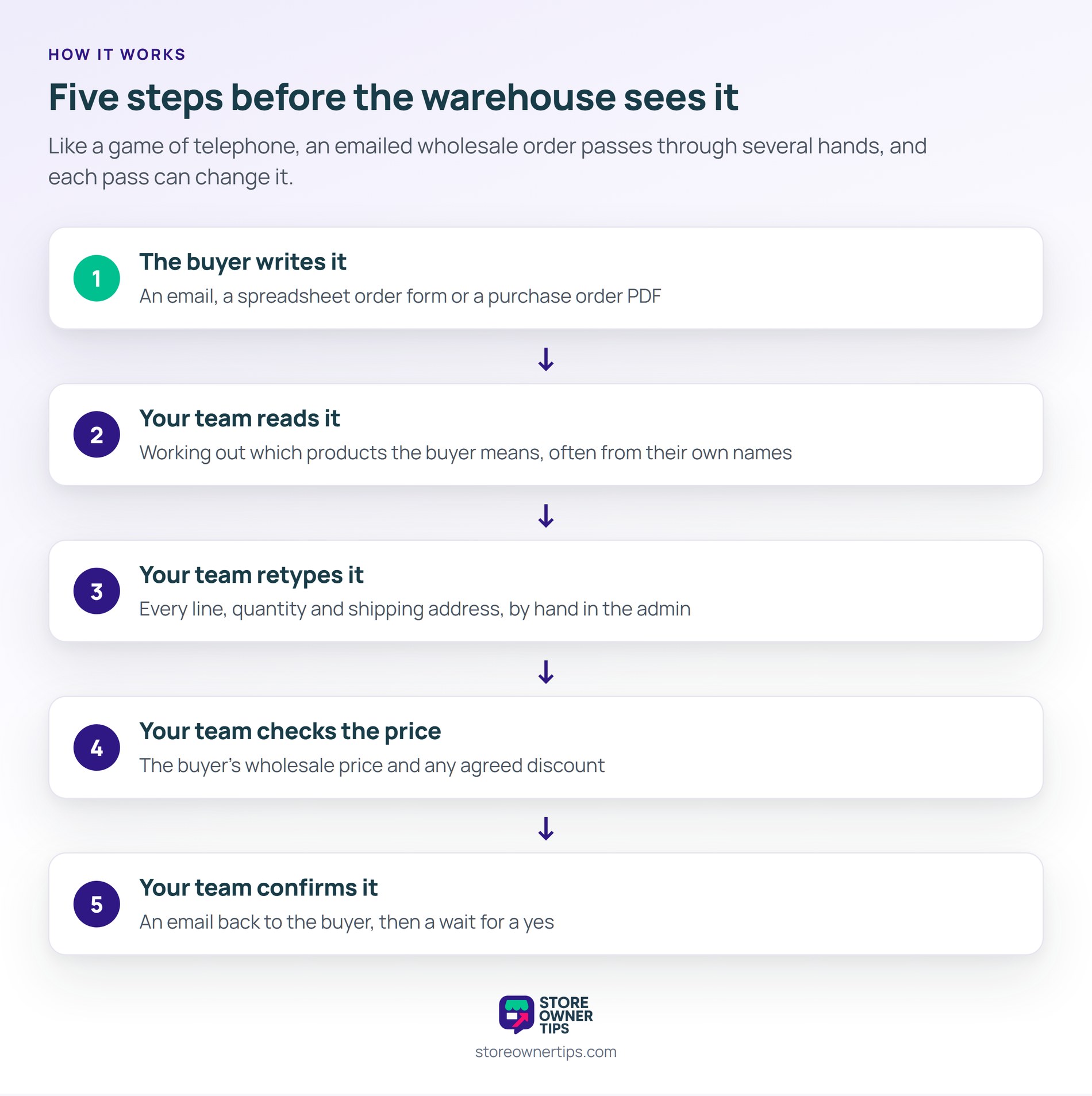
Think of manual order entry like a game of telephone. The message passes through several hands, and each pass can change it a little. In a typical wholesale store, an order travels like this:
In short, that’s five steps before the order even reaches the warehouse. Wholesale Suite’s guide to B2B order management in WooCommerce covers how this flow fits into the wider order process.
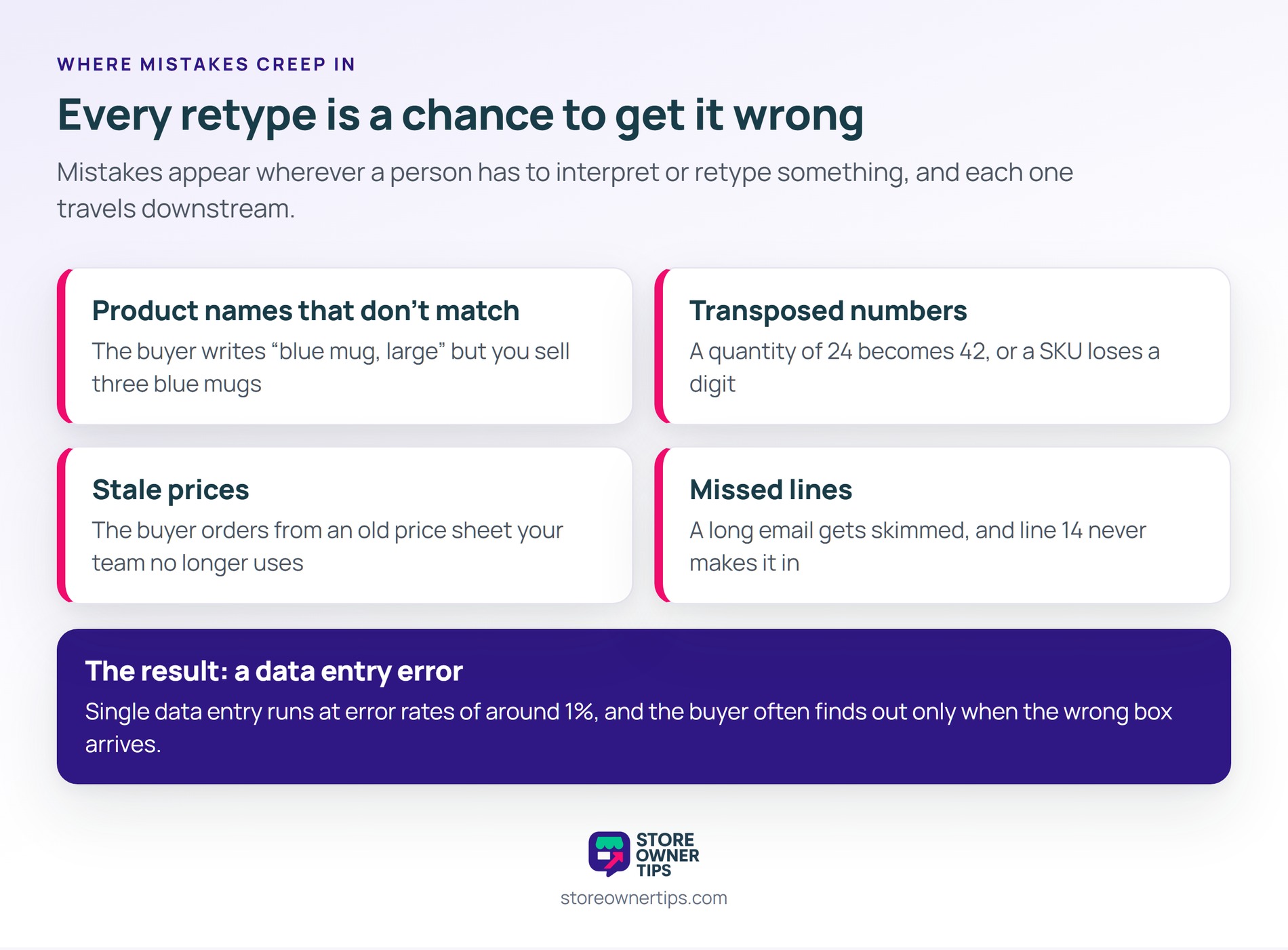
Manual order entry creates mistakes wherever a person has to interpret or retype something. These are the usual weak spots:
Each slip becomes a data entry error that travels downstream. In practice, the buyer often spots it only when the wrong box arrives.
Manual order entry gets worse with growth because the workload rises in a straight line with your order count. Ten more trade accounts means ten more inboxes to read and retype. Nothing about the process gets faster with practice.
Busy periods make it harder still. When orders pile up, staff rush, and rushed typing produces more errors. Meanwhile, orders that wait in the inbox ship later, and buyers notice.
Manual order entry also ties ordering to your office hours. A buyer who emails on Friday night may not get a confirmation until Monday. On top of that, the order often depends on one person who knows each account’s quirks.
When that person is sick or on leave, orders stall. That’s a hidden risk many small wholesale teams only notice during a holiday rush.
Buyers feel the cost as well. They have to write the order, wait for your reply and then check your confirmation line by line. For example, a cafe owner reordering the same ten items each month repeats that work every time. Wholesale Suite’s tips on giving a great ordering experience start from that buyer’s point of view.
Manual order entry is out of step with how most B2B trade already happens. The U.S. Census Bureau found e-commerce made up 67.8% of all manufacturing shipments in 2019. So most factory goods were already ordered electronically, not retyped from emails.
Buyers are also comfortable placing big orders online. McKinsey’s B2B Pulse Survey was reported by Digital Commerce 360. It found 39% of B2B buyers would spend over $500,000 per order through self-service or remote channels. That was up from 28% two years earlier.
Typing accuracy is the other side of the story. Researchers Barchard and Pace found that single data entry produces error rates of around 1%. That sounds small until you count every SKU, quantity and price on every order.
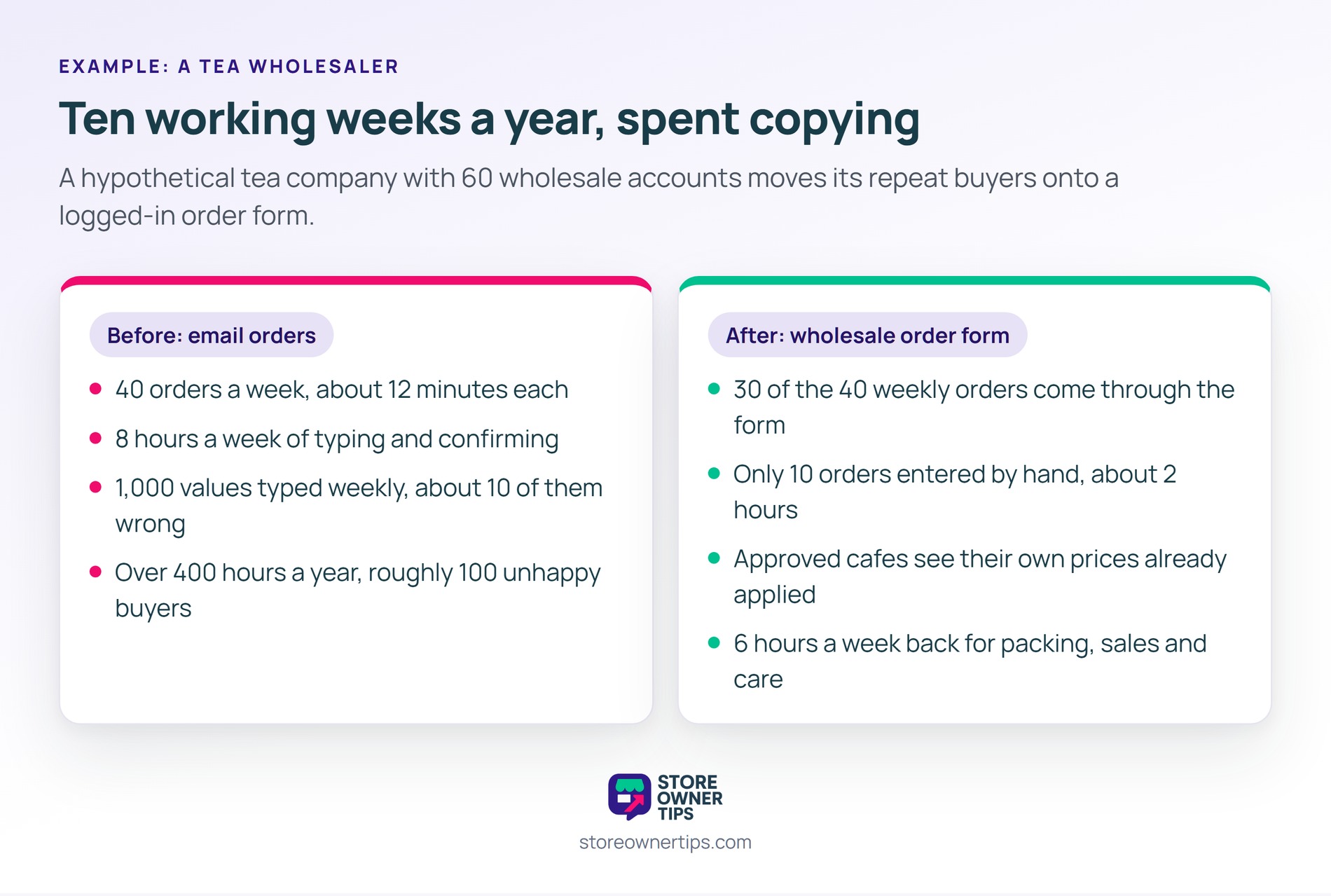
Manual order entry in practice looks like a capable team losing whole days to copying. Here’s a hypothetical example. Imagine a small company that sells specialty teas to cafes and gift shops.
The tea company has 60 wholesale accounts, and most of them order by email. The team receives about 40 orders a week. Each order averages five product lines.
An operations assistant reads each email and builds the order in the WooCommerce admin. Each order takes about 12 minutes to enter and confirm. That adds up to 480 minutes, or 8 hours, every week.
Each order carries about 25 values to type, counting SKUs, quantities, prices and address fields. Across 40 orders, that’s 1,000 values a week. At an error rate near 1%, roughly 10 wrong values slip through every week.
Of course, not every wrong value causes a problem, but some do. Suppose two a week become wrong shipments. Each one costs return shipping, a reshipment and an apologetic phone call. Over a year, that’s about 100 unhappy buyers from typing alone.
Then there’s the time cost. At 8 hours a week, the assistant spends over 400 hours a year retyping orders. That’s ten full working weeks spent copying.
The tea company sets up a logged-in wholesale order form. Approved cafes see the full catalog on one page, with their own prices already applied. They search, tick the products they want and add everything to the cart at once.
Within a few months, 30 of the 40 weekly orders come through the form. The assistant now enters only 10 orders by hand, which takes about 2 hours. As a result, six hours a week go back to packing, sales calls and customer care.
You reduce manual order entry by giving wholesale buyers a faster way to order than sending an email. If the online path is quicker for them, most will switch on their own. These steps help in a WooCommerce store:
Some buyers will still email, and that’s fine. However, when you do retype an order, send the buyer a confirmation before it ships. A two-minute check catches most errors while they’re still cheap to fix.
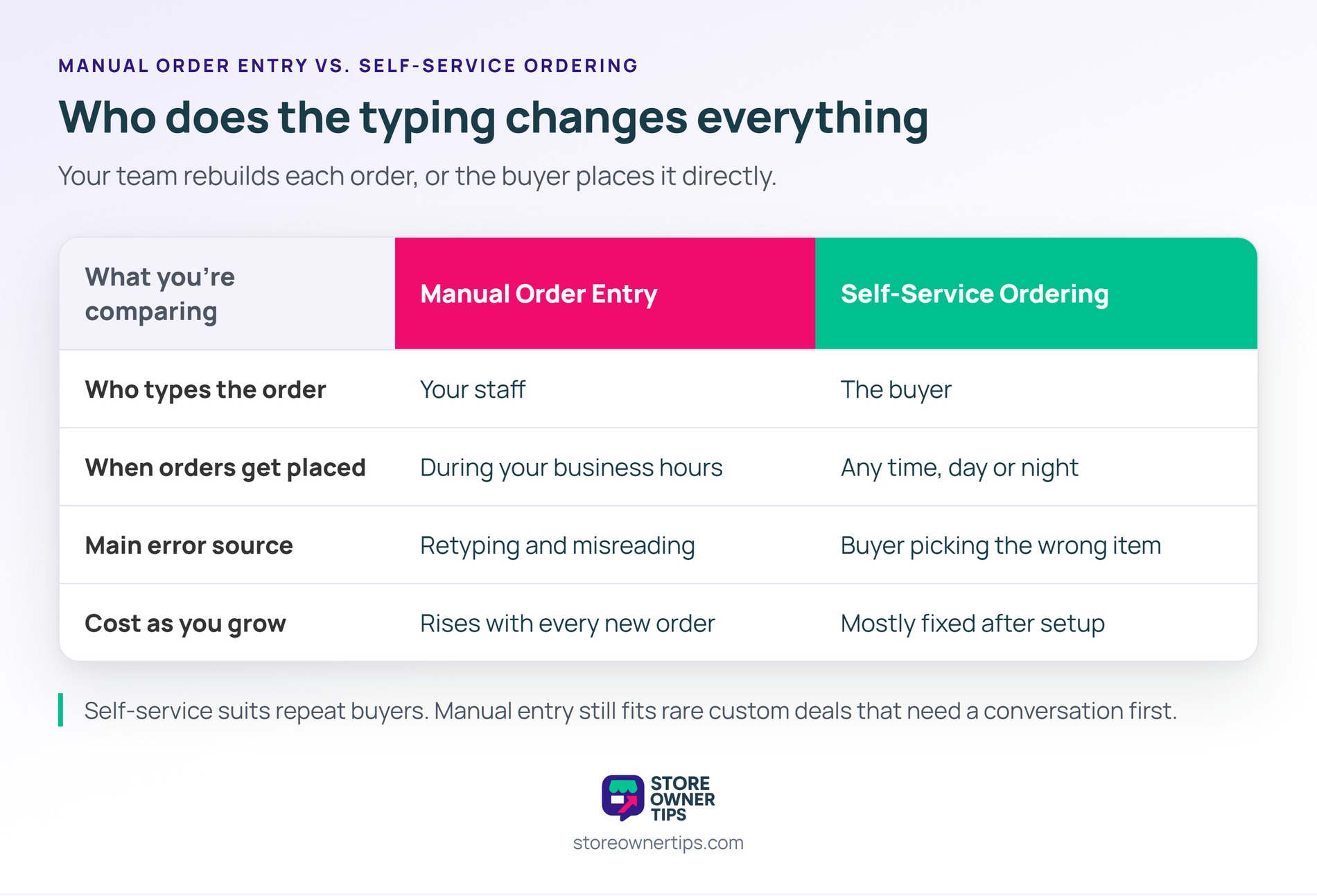
| What you’re comparing | Manual Order Entry | Self-Service Ordering |
|---|---|---|
| Who types the order | Your staff | The buyer |
| When orders get placed | During your business hours | Any time, day or night |
| Main error source | Retyping and misreading | Buyer picking the wrong item |
| Cost as you grow | Rises with every new order | Mostly fixed after setup |
Manual order entry means your team rebuilds each order, while self-service ordering lets buyers place orders directly. In general, self-service suits repeat buyers who know your catalog. Manual entry still makes sense for rare custom deals that need a conversation first.
Yes, wholesale customers can place their own orders once they have an approved account. They log in, see their wholesale prices and order through your store. An order form plugin makes this faster for buyers who order many products at once.
Make online ordering quicker than writing an email. Send each buyer their login and a link to a one-page wholesale order form. Then reply to emailed orders with a short note showing how to reorder online next time.
Manual order entry is worth keeping for unusual orders, like custom bundles or special pricing deals. It also helps buyers who truly can’t use a website. For routine repeat orders, though, self-service is faster and more accurate.
Manual order entry matters because it quietly caps how big your wholesale business can get. Every hour spent retyping is an hour not spent selling or serving customers. Moving repeat buyers to self-service ordering frees that time and cuts errors at the source.
Copyright © StoreOwnerTips.com. All Rights Reserved.
