Weekly ecommerce tips, deals & news.
Most stores meet invoicing the same way. A customer asks for an invoice, and you open the orders screen. Then you realise the store has never made one.
That’s when the plugin search starts, and most roundups lead with how many templates each plugin ships. Templates are the part you change once and then forget. The parts that actually go wrong are different. Does the document carry what your tax authority expects, and which order status creates it?
So we ranked the WooCommerce invoice plugins below on compliance first. Our pick is PDF Invoices & Packing Slips for WooCommerce. It’s the only free option here that names the full set of EU e-invoice formats. It attaches the file to the order emails you choose. It also has the largest install base of the seven.
Jump to:
An invoice is a numbered tax document. An order confirmation email is a receipt of a transaction. The two aren’t interchangeable, and mixing them up is one of the most common misunderstandings in this whole category.
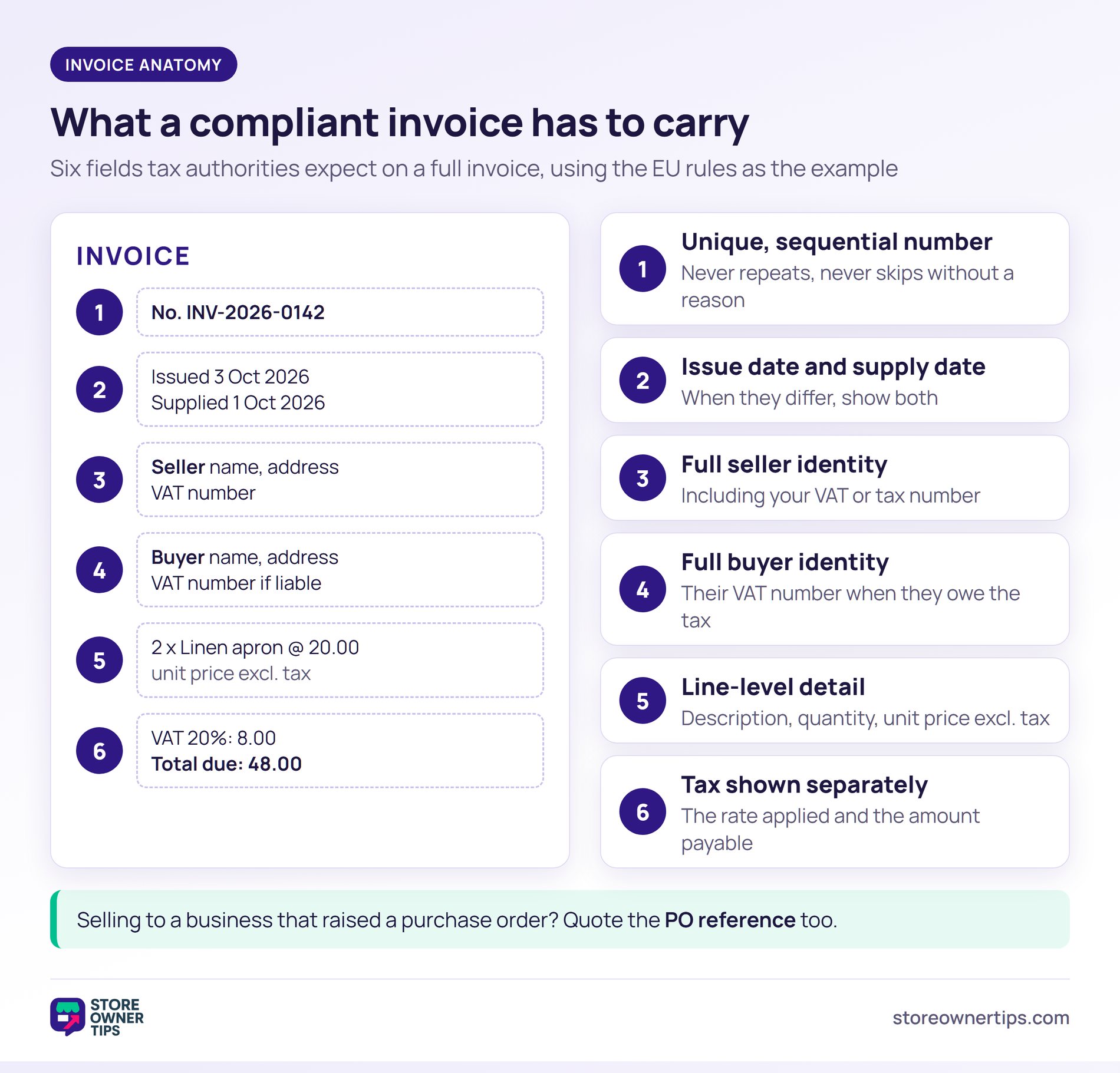
The exact fields depend on where you trade. Treat the list below as the shape of the problem, not legal advice for your country. The EU’s VAT invoicing rules are a good example of what tax authorities expect on a full invoice:
If you’re invoicing a business that raised a purchase order first, quote that reference on the invoice too. Otherwise their accounts payable team may not be able to match the two.
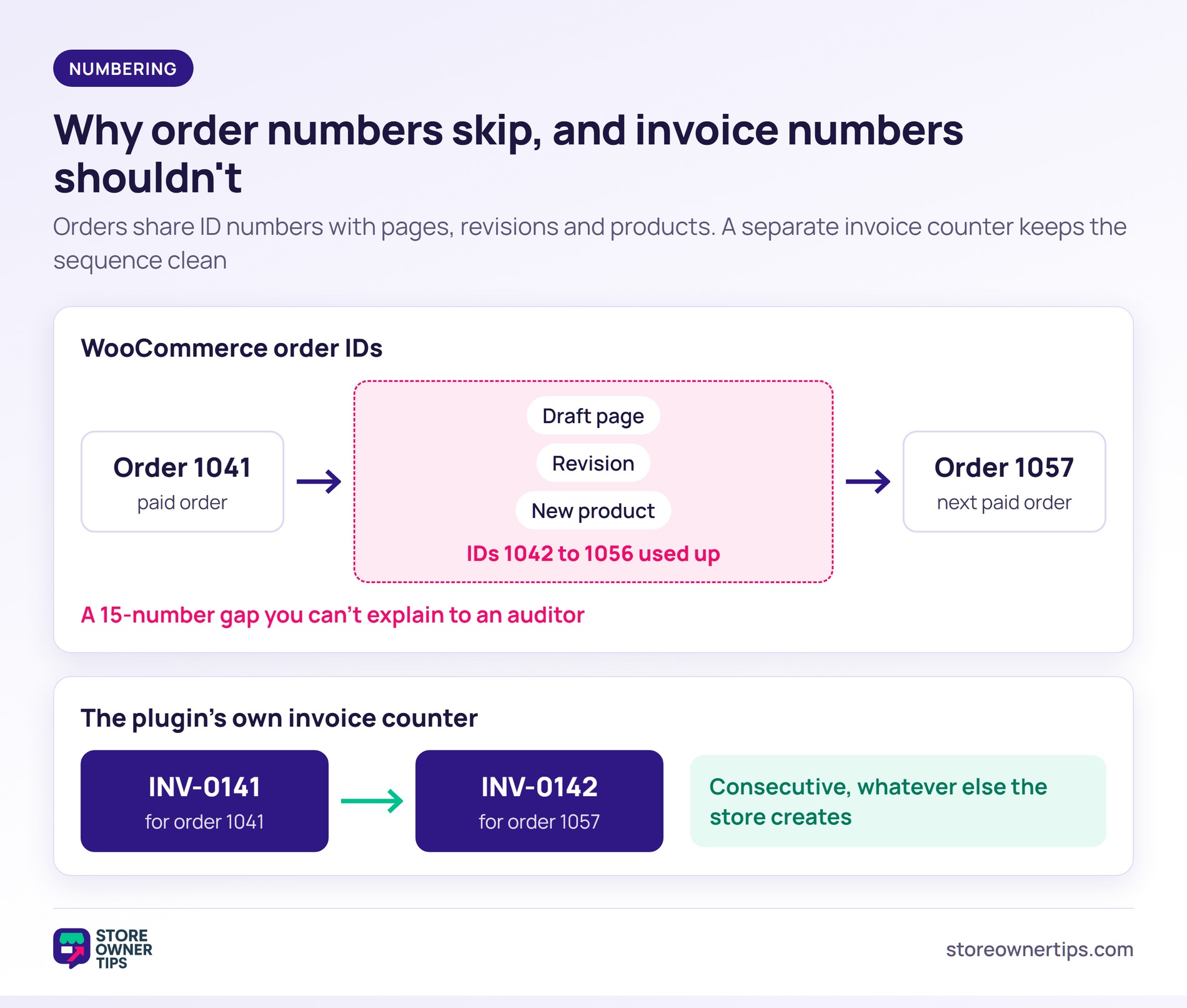
Sequential numbering is where WooCommerce itself can catch store owners out. WooCommerce order numbers aren’t sequential by default, because orders share their ID numbers with other content.
On older stores, orders are stored as posts. On stores using the newer order tables, WooCommerce still reserves each order’s ID in the posts table. So the same thing happens. A draft page, a revision, or a product created between two orders uses up an ID. Order 1041 can be followed by order 1057.
For order numbers, that’s untidy. For invoice numbers, it’s a real problem, because a sequence with unexplained gaps is exactly what an audit asks about. The better WooCommerce invoice plugins keep their own invoice counter, separate from the order ID. That’s worth more than a template gallery.
If you sell to other businesses in Europe, a PDF invoice is no longer always enough. A growing list of countries now requires structured e-invoices. These are machine-readable files, usually XML, that the buyer’s accounting system reads directly.
These files follow one European standard. The European Commission names EN 16931 as the standard, with UBL 2.1 and UN/CEFACT CII as its two mandatory formats. Those are the names to look for in a plugin’s feature list.
Here’s where the main deadlines stood when we checked the official sources on 3 October 2026:
| Where | What applies | When |
|---|---|---|
| Germany | Every domestic business must be able to receive e-invoices | 1 January 2025 |
| Germany | Issuing e-invoices to other domestic businesses becomes mandatory. Sellers with prior-year turnover up to €800,000 get one more year | After 31 December 2026, or 31 December 2027 for smaller sellers |
| Belgium | VAT-registered businesses must use structured e-invoices with each other | 1 January 2026 |
| France | Every business must receive e-invoices, and large and mid-size businesses must issue them | 1 September 2026 |
| France | Small and micro businesses must issue e-invoices too | 1 September 2027 |
| Poland | The national KSeF system becomes mandatory, starting with the largest sellers | 1 February 2026, then 1 April 2026 for most others |
| European Union | Digital reporting applies to cross-border B2B sales under the VAT in the Digital Age package | 1 July 2030 |
Most of these rules cover sales between businesses. If you only sell to consumers, they may not touch you yet, but check with your accountant rather than assuming. Rules also differ inside each country, so treat the table as a starting point, not legal advice.
This is why XML support sits at the top of our ranking of WooCommerce invoice plugins. A plugin that already produces UBL or CII files keeps working when a deadline reaches your market. One that only makes PDFs means switching plugins later, with a year of invoice numbering to carry across.
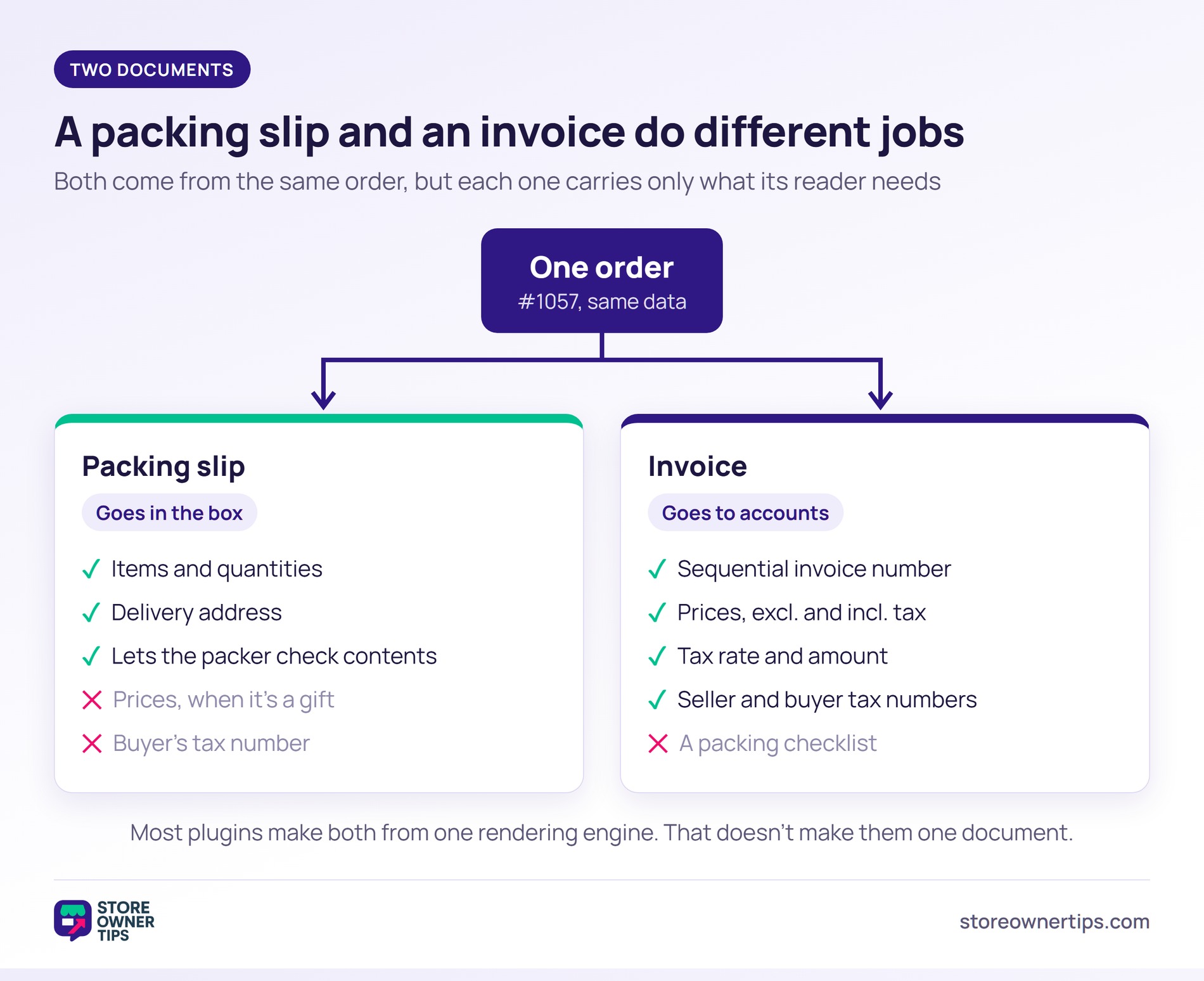
A packing slip goes in the box. An invoice goes to accounts. They come from the same order, but they deliberately carry different information.
The packing slip lists what’s physically in the parcel. Whoever packs it can check the contents, and whoever opens it can confirm the delivery is complete. It belongs to the fulfilment run from order to doorstep rather than to your accounts.
That’s why it usually leaves out prices when the parcel is a gift. There’s also rarely a reason to print the buyer’s tax number on it.
Most WooCommerce invoice plugins bundle both documents, because the same rendering engine produces both. That’s convenient. It’s also why so many store owners assume the two are one document with two names.
We ranked these WooCommerce invoice plugins on four things you can’t change cheaply later, rather than on template count:
We haven’t installed and tested all seven side by side, and we won’t pretend otherwise. What follows comes from each plugin’s own WordPress.org listing, documentation and pricing page, plus its public install and rating data. Where a feature is a paid add-on rather than part of the free plugin, we say so.
Install counts, ratings and prices below were read on 3 October 2026, and they change over time.
This is the category leader by a wide margin, and the right default for most stores. It has around 300,000 active installs, a 100/100 rating from 1,864 reviews, and an update from September 2026.
Its listing describes attaching a PDF or XML invoice to the WooCommerce emails of your choice. The XML side matters more than it sounds. It lists UBL 2.1, Peppol BIS 3.0, CII, Factur-X and ZUGFeRD formats, which covers the e-invoicing deadlines above.
The free plugin ships a basic template that you can modify, or you can build your own. Extra templates, credit notes and proforma invoices come from paid extensions, so budget for those if you need them.
Best for: almost any store that hasn’t chosen an invoicing plugin yet.
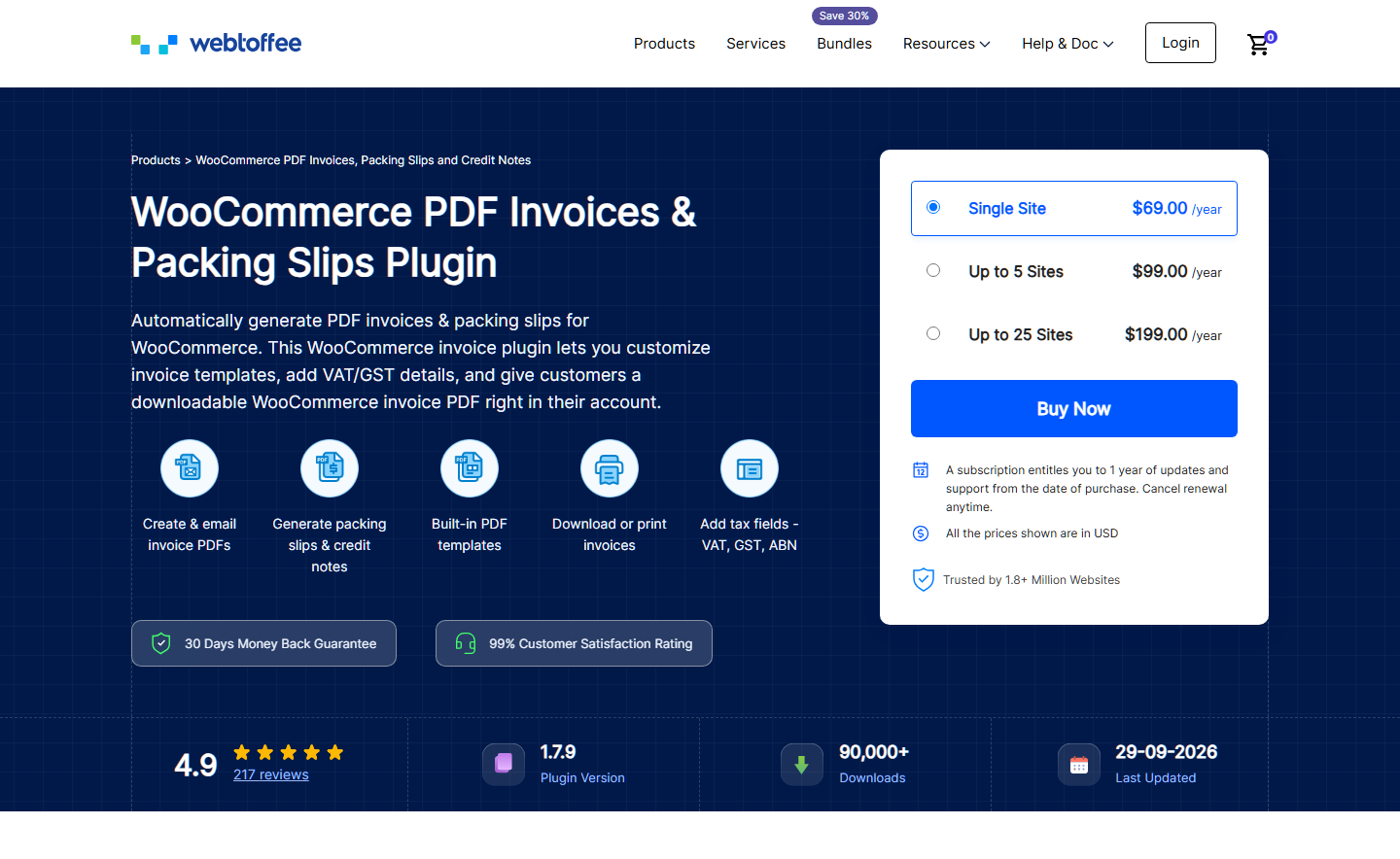
The strongest alternative, with around 50,000 active installs and a 98/100 rating. It covers the same core ground, and its free version also generates UBL and XML invoices. Its listing leads on template editing: you can edit the pre-designed template or build a custom one.
The document range is what sets it apart. Delivery notes sit alongside invoices and packing slips as their own document type. That’s useful if your packing team works from a delivery note rather than a packing slip. Credit notes are a Pro feature.
Best for: stores that need delivery notes as a separate document, not a relabelled packing slip.
Around 30,000 active installs and an 88/100 rating. Its listing names the widest document range of the free options here. That’s invoices, delivery notes, receipts, credit notes, and packing slips.
Credit notes are the reason to look at it. In most of the other plugins here, credit notes are a paid extra. Without them, you end up issuing corrections by hand. A plugin that produces a numbered credit note keeps the paper trail intact when an order changes after invoicing.
It also lists bulk printing and attaching invoice PDFs to WooCommerce emails, so the everyday basics are covered. There’s no paid version at all.
Best for: stores with regular partial refunds or returns.

This isn’t an invoicing plugin in the usual sense, and that’s exactly why it earns a place. It has around 70,000 active installs and a 96/100 rating. Its stated aim is adapting WooCommerce to the requirements of the German market, not producing prettier documents.
If you sell into Germany, compliance isn’t a feature you bolt onto a generic invoice plugin. It’s the whole problem. The paid Pro version adds PDF invoices and generators for model legal texts, such as terms and revocation pages. Read the free and Pro split before you commit.
The wider point applies even if Germany doesn’t matter to you. Where you trade decides which plugin is right far more than any feature table does.
Best for: stores selling into Germany, where a general-purpose plugin won’t be enough.
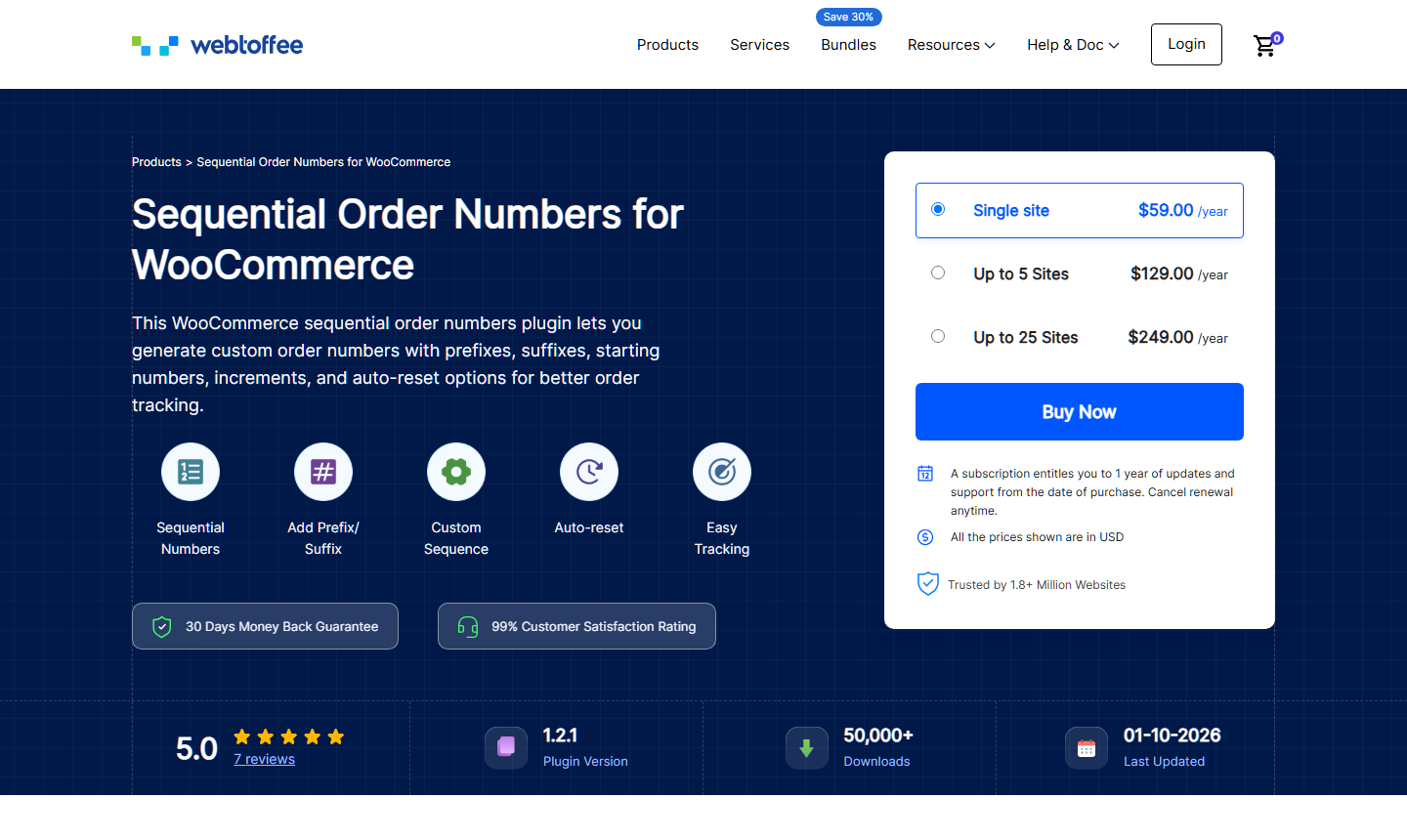
This isn’t an invoicing plugin either, but it’s worth having. It has about 50,000 active installs and a 98/100 rating, and it does one job. It turns WooCommerce order numbers into a true consecutive sequence, using prefixes, suffixes, starting numbers and increments.
Its listing explains the cause plainly: order IDs aren’t consecutive because of how WordPress stores content. If your invoicing plugin builds its invoice number from the order number, this plugin makes that safe. It can also reformat existing order numbers, not only new ones.
Best for: any store whose invoice numbering is tied to the order number.
Around 8,000 active installs and a 90/100 rating. It positions itself on breadth from one dashboard. You get PDF invoices attached to order emails, plus packing slips, shipping labels, and delivery notes.
Shipping labels are unusual in this group. That makes Challan interesting for a small store keeping its plugin count down. Labels normally mean a separate tool. Weigh that against the smaller install base. Fewer stores have hit the edge cases before you, and invoices have to be right.
Best for: small stores that want documents and labels in one plugin.
The smallest here, with around 2,000 active installs, but a 94/100 rating from its users. Its standout feature is a drag-and-drop PDF builder with ready-made templates, covering invoices, packing slips, and credit notes.
Look at this one if your document layout is genuinely unusual and you don’t want to edit template files. For most stores, one of the options above is the better starting point. Come here only if the template turns out to be the real constraint.
Best for: stores with unusual document layouts and no appetite for editing template code.
This table answers our four comparison questions for every plugin, side by side. It’s built from each plugin’s own WordPress.org listing and pricing page, read on 3 October 2026. “Not stated” means the listing doesn’t say, not that the feature is missing.
| Plugin | Invoice numbering | When it is created or sent | Credit notes | EU e-invoice formats | Paid version from |
|---|---|---|---|---|---|
| PDF Invoices & Packing Slips for WooCommerce | Its own sequential numbers | Attached to the WooCommerce emails you choose | Paid extension | UBL 2.1, Peppol BIS 3.0, CII, Factur-X and ZUGFeRD, in the free plugin | €69 a year |
| WebToffee PDF Invoices, Packing Slips, Delivery Notes | The order number, or its own custom sequence | Attached to the order confirmation email | Pro version | UBL and XML in the free plugin (exact formats not itemised) | $69 a year |
| Print Invoice & Delivery Notes for WooCommerce | Sequential and custom numbers | You choose which order statuses get print links in emails | Included free | Not listed | No paid version |
| Germanized for WooCommerce | PDF invoices are a Pro feature | Not stated in the free listing | Not stated | Not listed | €85, including VAT and 12 months of updates |
| Sequential Order Number for WooCommerce | Renumbers orders, both new and existing | Not applicable | Not applicable | Not applicable | $59 a year |
| PDF Invoices & Packing Slips for WooCommerce – Challan | Prefix, suffix and starting number. Yearly or monthly reset in Pro | Automatically on order status change | Pro version | None listed. Pro adds ZATCA e-invoicing for Saudi Arabia | $69 a year |
| PDF Builder for WooCommerce | Built from order details you configure | Sent with any WooCommerce email you configure | Listed (tier not stated) | Not listed | $59.99 one-off, with 1 year of updates |
Only two of these WooCommerce invoice plugins list EU e-invoice formats in their free version. Of those, only PDF Invoices & Packing Slips names each format. Print Invoice & Delivery Notes is the only one confirmed to include credit notes with nothing to buy.
Bulk generation is the closest thing to a given. Five of the seven list it. Challan adds downloads by date range, which helps when an accountant asks for one quarter’s documents.
Prices are for a single-site licence and mix currencies, because each vendor sets its own. Most are annual subscriptions that fund updates. PDF Builder is the exception, with a one-off price that includes a year of updates.
🔍️ What we’ve seen: the price column is the easiest one to compare. The numbering column costs more to get wrong. Switching plugins after a year of invoices usually starts a new numbering sequence. A break in that sequence is exactly what an auditor asks about.
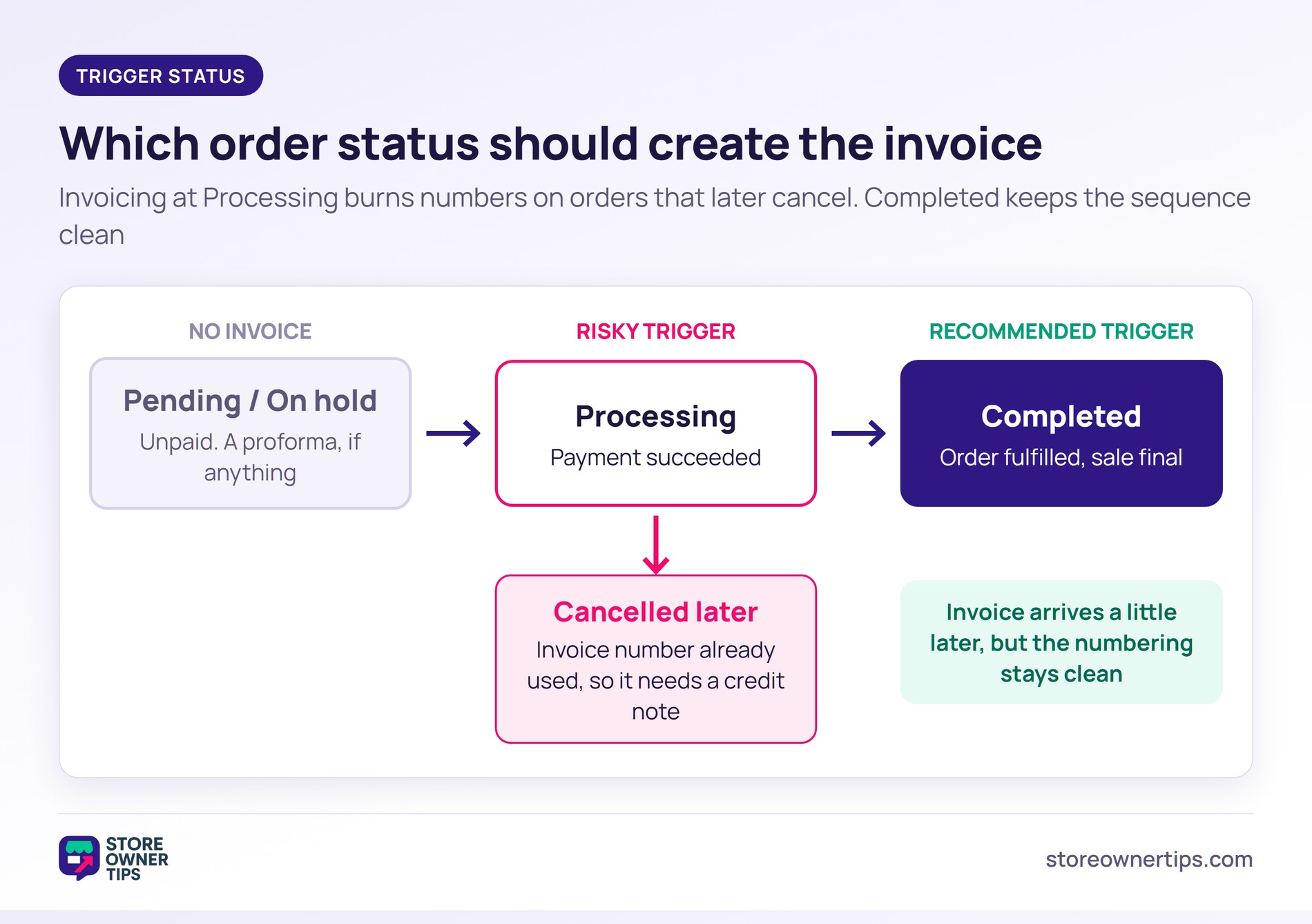
For most stores, choose the status that means the money is in and the sale is final. That’s usually Completed rather than Processing. Most WooCommerce invoice plugins let you pick which email carries the invoice. Check that setting rather than trusting the default.
Processing is set when payment succeeds, which feels right but causes a specific problem. Orders that are later cancelled have already used an invoice number. Your sequence now holds invoices for sales that never happened, and each one needs a credit note to explain it.
Completed is set when the order is fulfilled. The invoice reaches the customer later than they might expect, but the numbering stays clean. Clean numbering is the thing you’ll be asked about.
On hold and Pending payment orders shouldn’t generate an invoice at all. A document for an unpaid order is usually a proforma invoice. That’s a different document with different rules.
🔍️ What we’ve seen: a store sets invoices to generate on Processing, because that’s when the money lands. Then, at year end, a run of cancelled orders turns up with numbered invoices and no matching sales. The accountant’s first question is what those numbers were for, and by then nobody remembers.
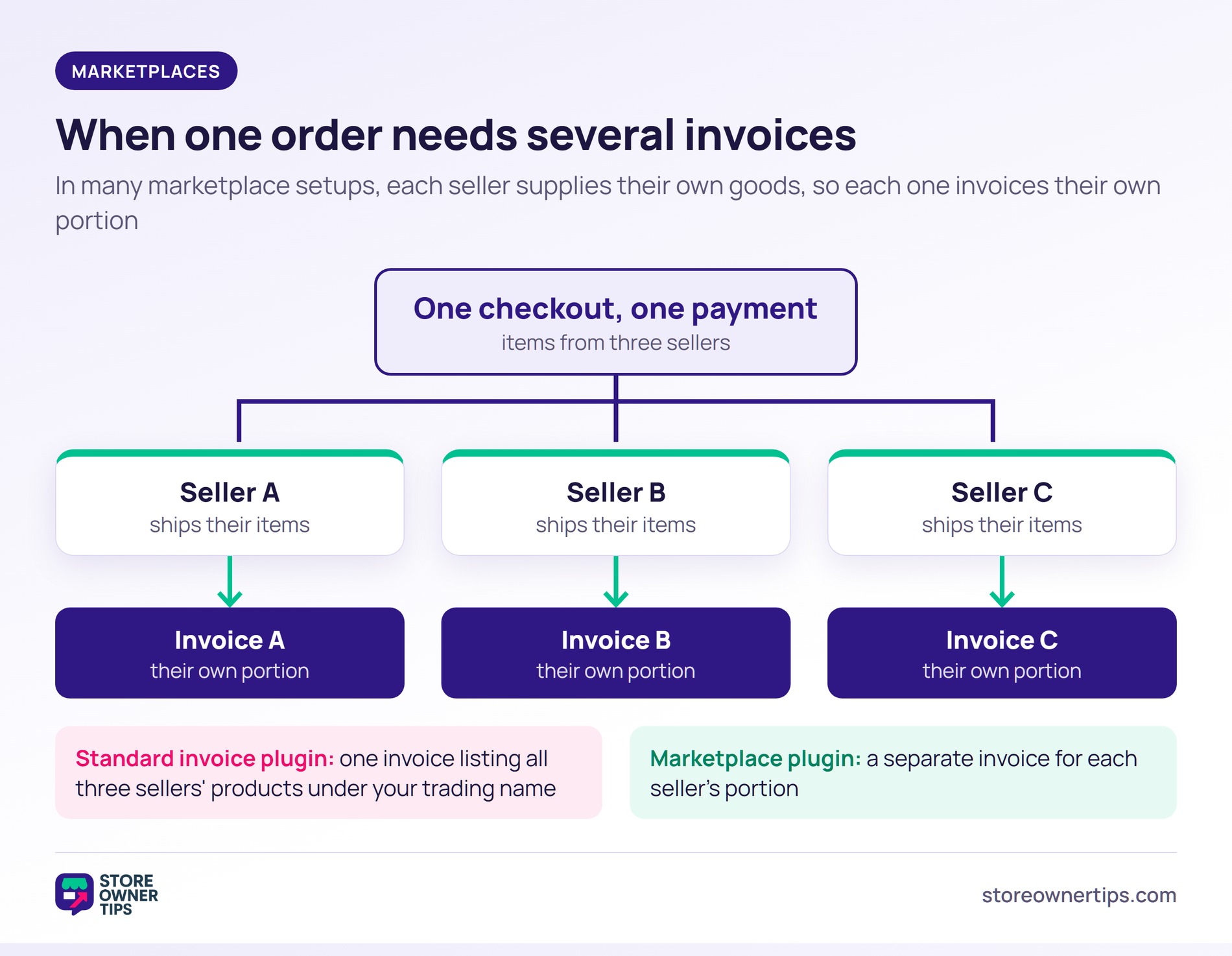
A marketplace order paid in one checkout but fulfilled by three sellers often needs three sets of paperwork. Standard WooCommerce invoice plugins will produce one document, listing all three sellers’ products under your trading name.
That can be a real problem. In many marketplace setups, each seller is the supplier of their own goods, so each one invoices their own portion. Tax rules for marketplaces vary by country, so confirm your model with an accountant.
This is a job for a marketplace plugin rather than an invoicing plugin. WC Vendors Pro generates printable separate invoices for purchases from each seller. It can also create monthly statements for sellers automatically, and you choose which seller fields appear on their invoices.
If you’re running a multi-seller marketplace, start there. Don’t try to make a single-store invoicing plugin split a document it was never designed to split.
The same idea applies to trade sales. Some stores invoice business customers on terms instead of taking payment at checkout. There, the invoice is part of a credit arrangement. B2B payment and net terms plugins handle the arrangement that the invoice documents.
No. WooCommerce can email customers an “Order details” message with their order information and payment links. That isn’t a numbered tax invoice, and WooCommerce doesn’t create PDF invoices on its own. For that, you need a plugin.
No. An order confirmation shows that a transaction happened. An invoice is a numbered document that records the sale and carries the specific fields your tax authority expects. Some places accept a detailed receipt instead, but don’t assume yours does.
Use a plugin that keeps its own invoice counter instead of reusing the WooCommerce order ID. Order IDs skip whenever other content is created between two orders. If your plugin does tie invoice numbers to order numbers, add a sequential order number plugin underneath it.
A credit note. It’s a separate numbered document that records the reversal, rather than an edit to the original invoice. Changing an issued invoice breaks the audit trail. Only some plugins here include credit notes for free, so check for it if partial refunds are routine for you.
Usually, yes. Most plugins here list bulk generation, which lets you create documents for past orders. Check how the plugin numbers backdated documents before you run it across a year of orders. That numbering is the part that’s hard to undo.

The honest summary is that the plugin matters less than two decisions around it. Pick any well-maintained option from this list. Then spend your attention on the numbering scheme and the trigger status. Those get expensive to change once a year of documents sits behind them.
Invoicing is one of a handful of jobs every store eventually hands to a plugin. It’s worth seeing alongside the WooCommerce plugins every store ends up needing, rather than solving it in isolation.
Here’s what to do next:
Once you’ve chosen, the next job is getting the store to produce documents automatically, not on request. Our guide to setting up WooCommerce invoices walks through the setup. It covers what happens when an order changes after the invoice goes out.

Copyright © StoreOwnerTips.com. All Rights Reserved.
