Weekly ecommerce tips, deals & news.
Your Black Friday deal is set. The coupon works, the banner is live, and the email tool is open. Then you stare at a blank template and wonder what the email should actually say.
In our experience, many stores send one big “SALE” blast on Friday morning. It lands next to dozens of other sale emails, and it gets lost. Good Black Friday email examples show a different path: a short series where each email has one job.
Below are 11 Black Friday email examples written for WooCommerce stores. Each has a subject line, preview text, and copy you can adapt. You’ll also get a 2026 send calendar, 25 more subject lines, and the checks to run before Black Friday week.
Jump to:
Black Friday emails earn their place because shoppers spend heavily that weekend and still check their inbox for deals. Adobe forecasts $12.9 billion in US online spending on Black Friday 2026 and $15.1 billion on Cyber Monday.
The inbox is crowded, but it still converts. Here’s what 2025 data from email platforms shows:
That busy inbox is why a plan beats a single blast. Mailchimp also found weekend order rates were twice as high as weekday rates. Yet brands sent about 60% fewer messages on weekends. So the right email at the right moment matters more than sending more.
In 2026, Black Friday falls on November 27 and Cyber Monday on November 30. A full Black Friday email series runs for about four weeks, from early November to the first days of December. That gives early planners and last-minute shoppers an email that fits them.
Here’s what this looks like in practice (example schedule):
| When | Goal | |
|---|---|---|
| Early November | Save-the-date teaser | Build a list of interested buyers |
| Around November 20 | Gift guide by budget | Help undecided shoppers pick |
| November 24 to 26 | VIP early access | Reward loyal customers first |
| November 27 (Black Friday) | Sale launch, then wishlist alerts | Turn interest into orders |
| November 28 to 29 | Mid-sale reminder or new offer | Reach people who missed day one |
| November 30 (Cyber Monday) | Cyber Monday offer and last call | Close out the weekend |
| December 1 and later | Thank-you and shipping cutoff | Keep buyers coming back |
Small Business Saturday falls on November 28, between the two. SaveTo Wishlist covers how to make Small Business Saturday work for WooCommerce stores.
That said, you don’t need every row, or all 11 Black Friday email examples below. In practice, a small store might send four or five emails in total. If your list rarely hears from you, start lighter, because a sudden flood invites email fatigue and unsubscribes.
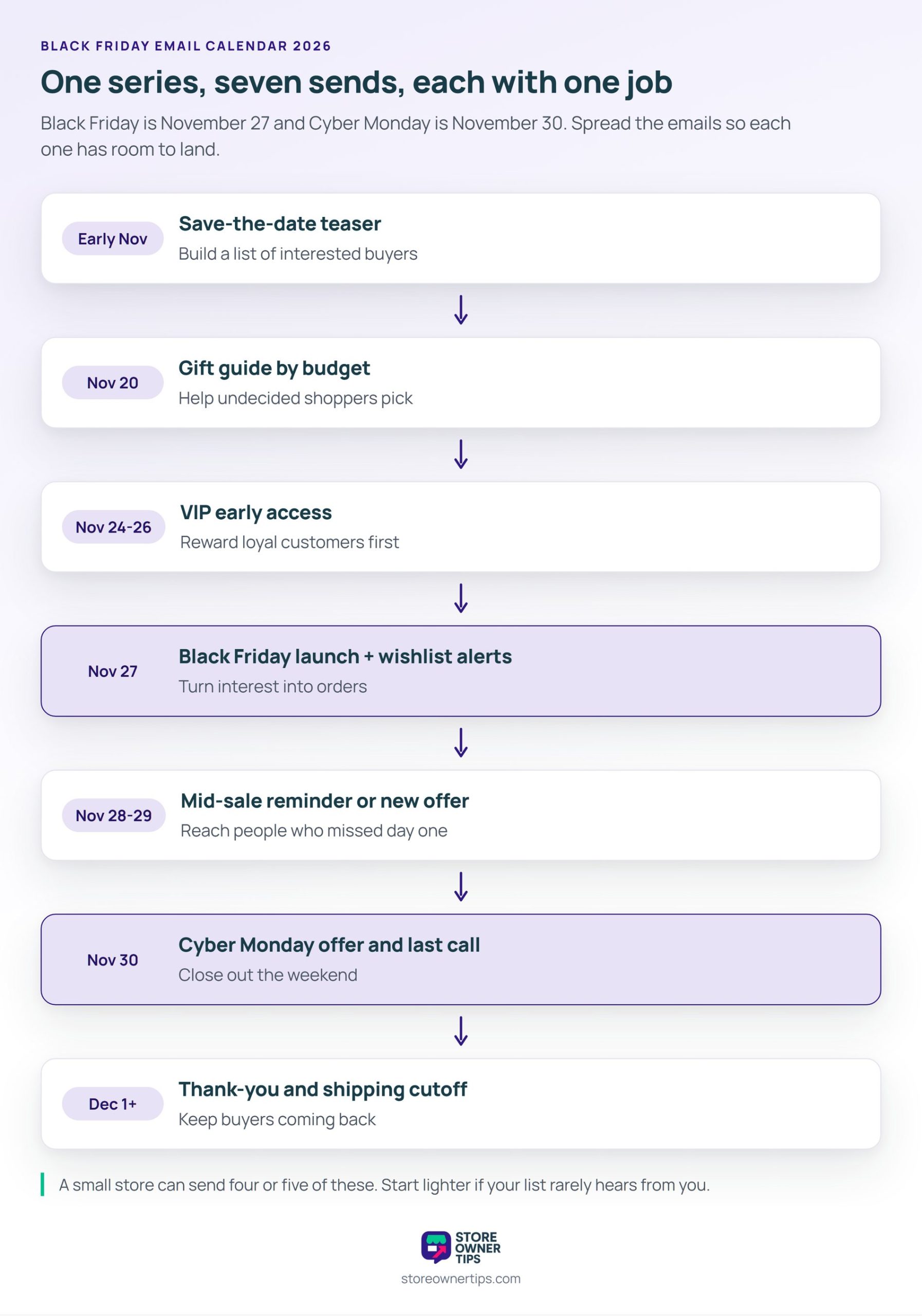
These Black Friday email examples follow the calendar above, from the first teaser to the post-sale thank-you. They’re templates we wrote for WooCommerce stores, not copies of other brands’ emails. For visual design ideas, browse the Really Good Emails Black Friday gallery.
From there, swap the brackets for your own products, discounts, and dates. Each of these Black Friday email examples keeps to one offer and one button.
Email copy: Our Black Friday sale starts Friday, November 27. We can’t share the prices yet, but here’s a hint: [category] is included. Want first dibs? Click below and we’ll email you before it opens. [Button: Get early access]
Why it works: It turns a passive list into a group of people who raised their hand. As a result, those clicks become your VIP segment for example 3.
Email copy: Shopping for a few people this year? We’ve grouped our most-loved products by price, so you can find something fast. [Three product blocks: Under $25, Under $50, Under $100] [Button: Shop the gift guide]
Why it works: Budget is the first filter most gift buyers use. So a guide sent before Black Friday lets shoppers build a list, then buy once the discount opens.
Email copy: You’ve shopped with us before, so you get first pick. From today until Friday, use the link below for [X]% off before the rest of our list. [Button: Shop early]
Why it works: Early access rewards loyalty. It also spreads your orders over several days, which eases the load on your packing table. With Advanced Coupons, you can restrict a coupon to certain user roles in the free version. That way, only VIP customers can use it.
Email copy: It’s here. Everything in the store is [X]% off until Monday at midnight. Click below and the discount applies automatically. [Button: Shop the sale] [Short list of three bestsellers]
Why it works: The offer sits in the subject line, the first sentence, and the button. So skimmers see it in seconds. Plus, a URL coupon from Advanced Coupons applies the code on click, so nobody has to copy and paste.
Email copy: Good news: an item on your wishlist is part of our Black Friday sale. [Product image, old price, new price] Stock is limited at this price. [Button: Buy now]
Why it works: It’s about a product the shopper picked themselves, which makes it more personal than a sitewide blast. SaveTo Wishlist sends price-drop alerts on the Growth plan and above. However, the alert fires when you save the sale price. So a sale price scheduled ahead of time triggers the email early.
Email copy: This weekend, your savings grow with your cart. Spend $50 and save $10, or spend $100 and save $25. Reach $150 and you save $40. [Button: Start shopping]
Why it works: Tiers give shoppers a reason to add one more item. Advanced Coupons covers this with tiered discounts, though tiered cart discounts need the Premium version.
Email copy: Looks like you left something behind. Your Black Friday price is saved until Monday at midnight. [Cart contents] [Button: Return to my cart]
Why it works: Shoppers compare many stores over the weekend, so more carts get left behind. Already running abandoned cart emails? Swap in a Black Friday subject line and the weekend deadline.
Email copy: Quick reminder: our Black Friday prices end at 11:59 p.m. tonight. If something’s still in your cart or on your wishlist, now’s the time. [Button: Shop before midnight]
Why it works: The deadline is real, so the urgency is honest. Still, make sure the coupon actually stops at midnight. Advanced Coupons can schedule a coupon with an end date and time in the free version.
Email copy: Missed Black Friday? Today’s offer is different: [new offer, e.g., free shipping on every order, or [X]% off [category]]. It ends at midnight. [Button: See today’s deal]
Why it works: A repeat of Friday’s offer gives subscribers less reason to open. By contrast, a new angle like free shipping or a different category gives Monday its own story. Advanced Coupons has more Cyber Monday promotion ideas to pick from.
Email copy: Our last shipping date for holiday delivery has passed. But a gift card arrives by email and never needs wrapping. [Gift card amounts] [Button: Send a gift card]
Why it works: It sells something that doesn’t need a courier, so you can keep earning after shipping stops. Also, Advanced Coupons explains how ecommerce gift cards work for WooCommerce stores.
Email copy: Thank you for shopping with us this Black Friday. Your orders are on their way. Here’s how to track yours, and here’s what’s coming in December. [Button: Track my order]
Why it works: A no-sale email gives tired inboxes a break and builds goodwill for your next campaign. After that, our post-Black Friday guide covers what to do with your new customers next.
🔍️ What we’ve seen: The emails stores forget are the non-sale ones. That means the teaser before and the thank-you after. Yet those two often decide whether a first-time buyer comes back. Write them first, while you still have time.
Strong Black Friday subject lines are short and name the offer. According to Klaviyo, the typical subject line runs about seven words, emojis included. Since every store emails the same weekend, being clear works better than being clever.
Then pair each line with preview text that adds a detail, like the end date or the discount. That second line can tip a reader from skimming to clicking.
Most Black Friday shoppers will read your email on a phone, so design for that screen first. The same Adobe forecast expects a record 63% of Cyber Week online spend to come through mobile in 2026. That’s up from 61.6% in 2025.
Here’s what that means for the Black Friday email examples above:
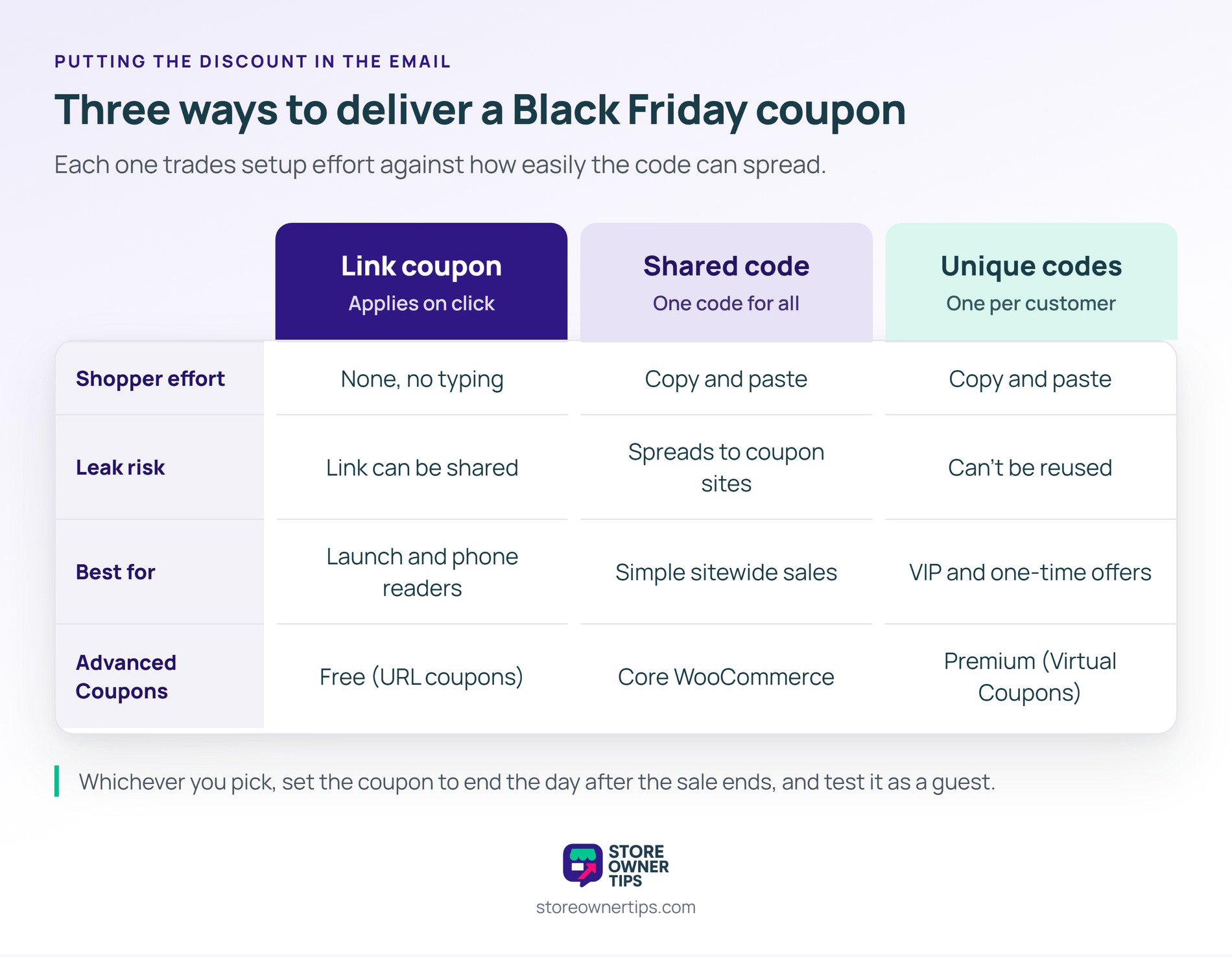
A good Black Friday coupon email applies the discount without asking the shopper to type anything. There are three common ways to do it, and each one fits a different goal.
Also, decide how this deal combines with others before you send. Tick Individual use only so a Black Friday code can’t stack with a welcome code. For more offer ideas, see our Black Friday sale ideas.
Email segmentation means sending each group the email that fits it, instead of one message to everyone. During Black Friday, that keeps your emails relevant when inboxes are at their busiest.
Start with these four segments, and match each one to the Black Friday email examples above:
Does your email tool not sync with WooCommerce? You can export customer emails from your store and import them as lists. Or compare tools with a native sync in our WooCommerce email marketing plugins roundup.
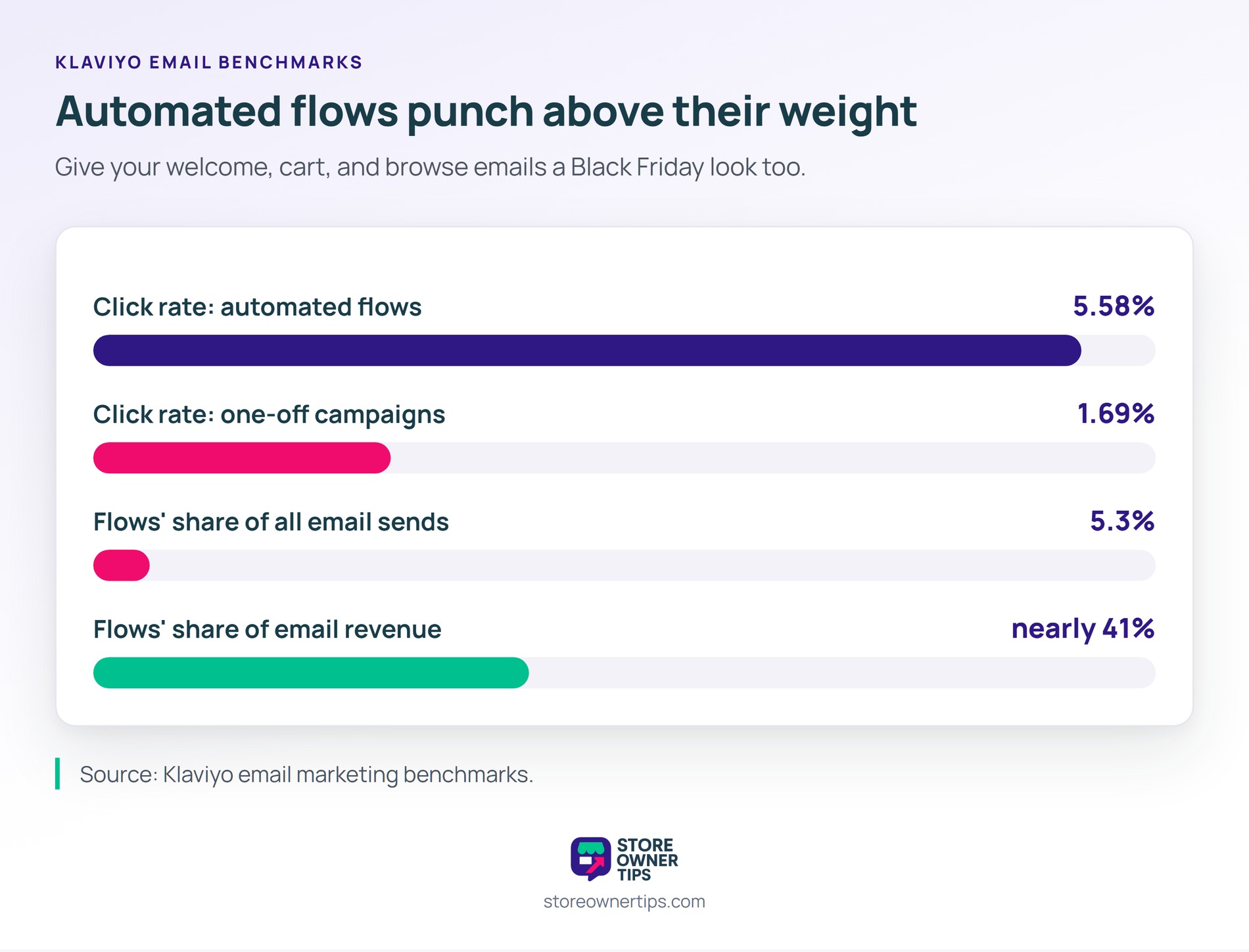
Your automated emails keep working all weekend, so give them seasonal copy too. According to Klaviyo, automated flows get a 5.58% click rate, compared with 1.69% for one-off campaigns. Flows also earn nearly 41% of email revenue from only 5.3% of sends.
So add the Black Friday offer and end date to your welcome, cart, and browse emails. Then switch them back on December 1. Our guide to WooCommerce email automation covers which workflows to set up first.
Black Friday week is a hard time to find a deliverability problem. Since February 2024, Gmail requires everyone sending to Gmail accounts to set up SPF or DKIM. It also expects spam complaints to stay below 0.3%.
If you send more than 5,000 messages a day to Gmail, three more rules apply:
Yahoo sets similar rules and asks senders to honor unsubscribes within two days. Google’s sender FAQ adds that once you cross 5,000 a day, you’re treated as a bulk sender permanently. For a refresher, our glossary entry on email deliverability explains the basics.
🔍️ What we’ve seen: Some stores stay quiet all year, then send daily from Black Friday to Cyber Monday. Their later emails often slide into spam. Send one or two regular emails in early November first. Then your sale emails arrive from a sender inboxes already recognize.
Send every Black Friday email to yourself before it goes to your list. Then test the coupon the way a shopper would.
Finally, one more detail for one-time offers. WooCommerce’s usage limit per user tracks guests by billing email. So a guest can reuse a code with a second address. If that matters, use unique codes instead.
🔍️ What we’ve seen: The expiry date is the setting that catches stores out. A coupon set to expire on November 30 stops working the moment Cyber Monday starts. That’s right when your last-call email goes out, so test it the day before.
Judge Black Friday emails by clicks, orders, and revenue, not opens. Apple’s Mail Privacy Protection loads email content in the background. So many emails count as “opened” whether or not anyone read them.
In practice, that covers a large share of most lists. According to Litmus, Apple Mail accounted for 62.26% of tracked opens in July 2026. So a high open rate on its own proves little.
Track these instead:
Compare against last year’s Black Friday, not against a normal week. After all, every store’s numbers jump that weekend. So the useful question is whether this year beat last year.
Strong Black Friday email examples have one thing in common: each email has a single job. Some build interest, some sell, and some keep buyers coming back. Planned as a series, they reach shoppers in early November and again after Cyber Monday.
Here’s what to do next:
URL coupons and coupon scheduling come with the free version of Advanced Coupons. Premium adds tiered cart discounts and bulk unique codes. Compare Advanced Coupons plans to power the offers in your Black Friday email examples.
Send a save-the-date teaser in early November, about three weeks before Black Friday on November 27, 2026. Then follow with VIP early access a few days before the sale. Starting early helps you reach shoppers who plan their purchases in advance.
Most small stores do well with four to eight emails between early November and early December. Cover a teaser, the launch, a reminder, Cyber Monday, and a thank-you. Also, send fewer to inactive subscribers to keep complaints down.
Include one clear offer, the end date, and one button. Put the discount in the subject line and the first sentence, and use preview text to add a detail. A link coupon that applies automatically saves shoppers from typing a code.
Usually not. A new offer gives subscribers a reason to open again, such as free shipping or a different category. If you do extend Friday’s deal, say so clearly and give the new end time.
A good one is short, names the offer, and adds a deadline when there is one. Klaviyo found the typical subject line runs about seven words. Examples include “Ends tonight: 30% off” and “Black Friday starts early for you.”

Copyright © StoreOwnerTips.com. All Rights Reserved.
