Weekly ecommerce tips, deals & news.
Coupon hunting is when a shopper leaves your checkout to search the web for a discount code. It usually starts the moment they spot an empty coupon box. Some come back with a code, some come back empty-handed, and many never come back at all.
Coupon hunting works by turning a shopper’s attention away from paying and toward searching. It happens late in the funnel, after the shopper has already chosen products and decided to buy. That timing is what makes it so expensive.
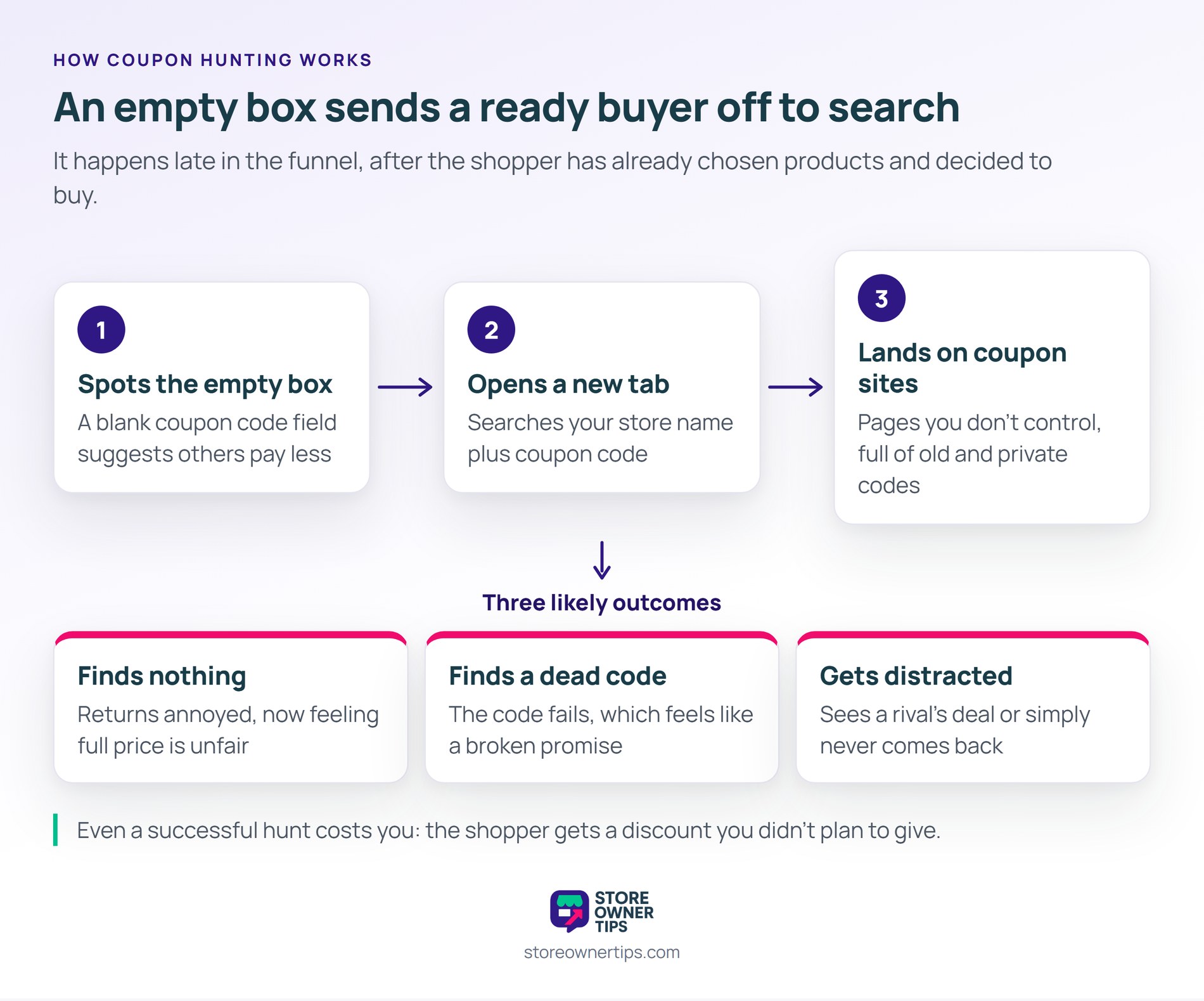
Coupon hunting almost always starts with a blank field labeled with words like coupon code or promo code. Think of it like a “Members get 20% off” sign at a store counter. If you’re not a member, you suddenly feel like you’re overpaying.
Empty form fields grab attention because people assume they’re meant to fill them in. A coupon field also carries a second message: a cheaper price exists, and you don’t have it. For a shopper on a budget, that’s hard to ignore.
In WooCommerce, the classic checkout tucks the field behind a “Have a coupon?” link. However, the classic cart page shows the coupon box open by default. Many themes and checkout plugins also move it into plain view.
Coupon hunters usually open a new tab and search for your store name plus the words coupon code. The results are mostly coupon aggregator sites, not your own pages. Those sites list every code they can find, including expired ones, one-time codes, and codes meant for other customers.
That creates three outcomes, and only one of them is good for you:
Even a successful hunt has a cost. The shopper gets a discount you didn’t plan to give. Plus, that code may have been meant for a VIP list.
Coupon hunting breaks the buying momentum a shopper built up while filling the cart. Once they leave checkout, your store is just one tab among many. The urge to buy fades while they read search results.
Coupon hunting also costs time even when the shopper does return. Each failed code means another search, another tab, and another chance to quit. A shopper who tries three dead codes in a row often decides your store is the problem.
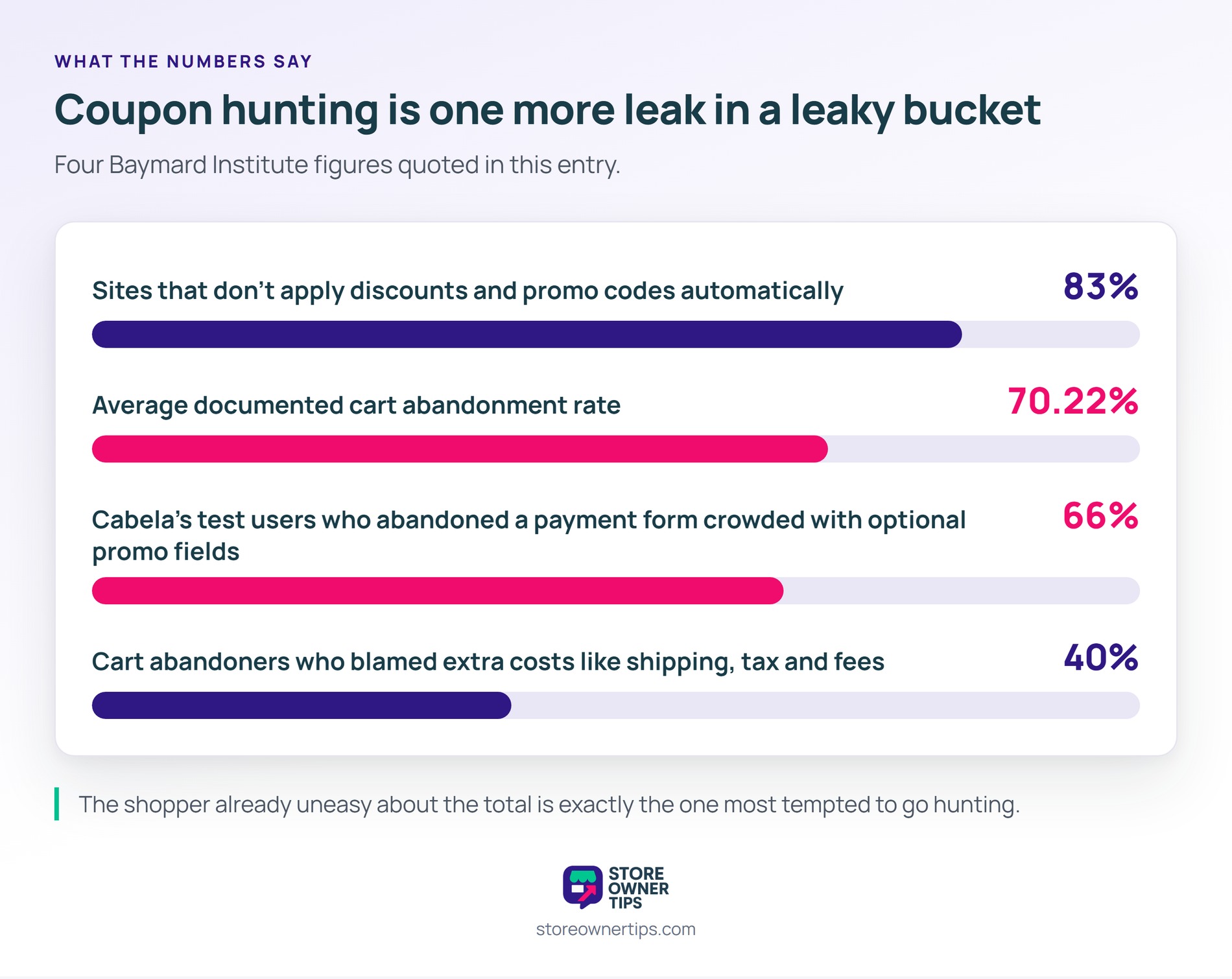
Price worries make this worse. In Baymard Institute’s survey, 40% of shoppers who abandoned a cart blamed extra costs like shipping, tax, and fees. A shopper already uneasy about the total is exactly the one most tempted to go hunting.
Coupon hunting shows up again and again in Baymard Institute’s checkout usability testing. Baymard calls “coupon hunting” a persistent issue. In one test, 66% of Cabela’s users abandoned the payment form after being overwhelmed by optional promotional fields.
The fix is still rare. Baymard’s benchmark found that 83% of sites don’t apply discounts and promo codes automatically. So most stores still ask shoppers to bring their own code.
All of this sits on top of a high baseline. Baymard puts the average documented cart abandonment rate at 70.22%. Coupon hunting is one more leak in a bucket that’s already losing most of its water.
You stop coupon hunting by removing the reason to search. That means hiding the empty box and handing shoppers the deals they qualify for. Here are the moves that work best in a WooCommerce store:
Advanced Coupons covers the last three moves. Its URL coupons and one-click apply notices let shoppers add a code without typing. URL coupons are part of the free plugin. Meanwhile, auto-apply coupons are a Premium feature that applies a deal once the cart meets your conditions.
To measure progress, compare your checkout drop-off rate for a few weeks before and after the change. Next, check how often orders use codes you never published, since that shows how much hunting still succeeds. Your coupon reports can also show which codes appear most on orders from new customers.
Coupon hunting is easiest to see with real numbers, so here’s a hypothetical example. Picture an online tea shop called Leaf & Kettle that runs on WooCommerce.
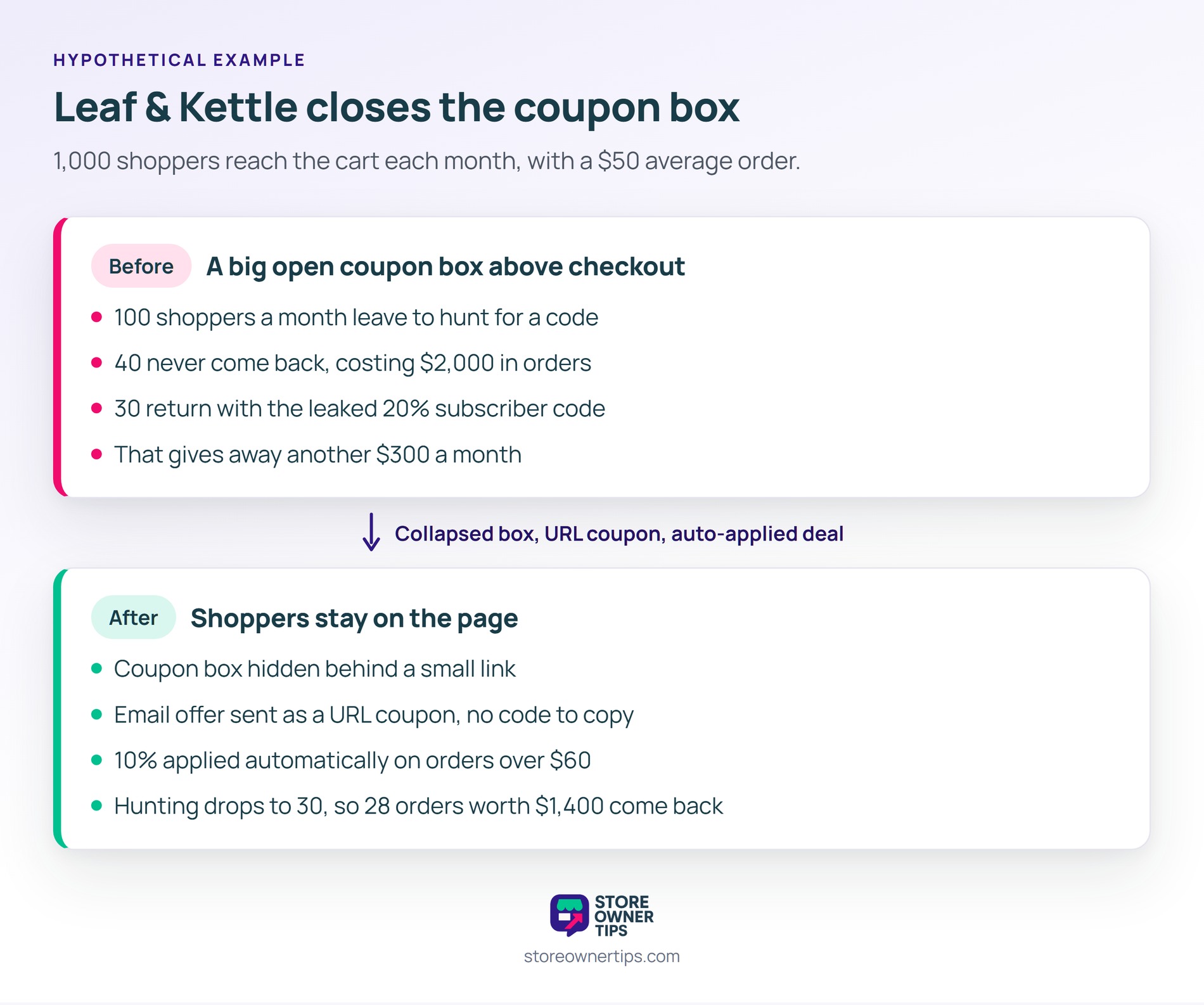
Leaf & Kettle gets 1,000 shoppers to its cart page each month. Its theme shows a big open coupon box right above the “Proceed to checkout” button. The average order is $50.
The owner sends a 20% code to email subscribers once a month. She has never posted it publicly. Even so, the code shows up on three coupon sites within weeks.
Say 1 in 10 cart visitors, or 100 shoppers, leaves to hunt for a code. Of those 100, 40 never come back. That’s $2,000 in lost orders every month.
The other 60 return, and 30 of them bring the leaked 20% code. Each of those orders gives away $10 the owner never meant to spend. That’s another $300 a month in unplanned discounts.
The owner collapses the coupon box behind a small link. Then she switches her email offer to a URL coupon, so subscribers never see a typed code. She also auto-applies a 10% discount on orders over $60.
Now say hunting drops from 100 shoppers to 30. Only 12 are lost each month, so she recovers 28 orders worth $1,400. In short, a page layout change and smarter code delivery pay for themselves within days.
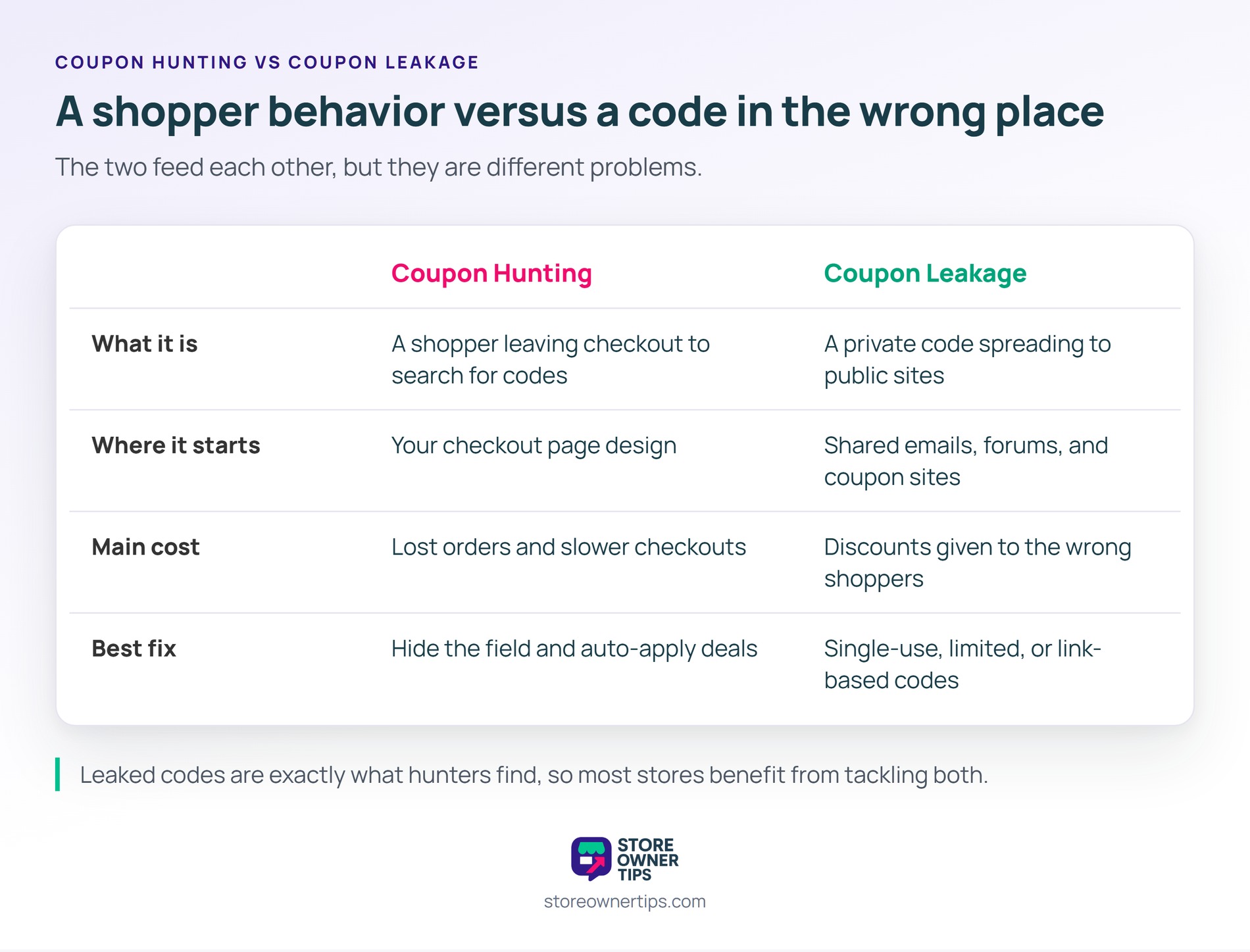
Coupon hunting is a shopper behavior, while coupon leakage is a code ending up where it shouldn’t. The two feed each other, but they’re different problems:
| What you’re comparing | Coupon Hunting | Coupon Leakage |
|---|---|---|
| What it is | A shopper leaving checkout to search for codes | A private code spreading to public sites |
| Where it starts | Your checkout page design | Shared emails, forums, and coupon sites |
| Main cost | Lost orders and slower checkouts | Discounts given to the wrong shoppers |
| Best fix | Hide the field and auto-apply deals | Single-use, limited, or link-based codes |
Fix coupon hunting first if your checkout drop-off is high. Fix coupon leakage first if you see codes on orders you never sent them to. Most stores benefit from tackling both, since leaked codes are exactly what hunters find.
You usually shouldn’t remove the coupon field entirely, because shoppers with a real code need somewhere to enter it. Instead, collapse it behind a small link and place it below the payment fields. That keeps it available without drawing every shopper’s eye.
Customers leave checkout to look for coupon codes because an empty coupon box suggests a better price exists. Nobody wants to feel like the only person paying full price. Shoppers who are already worried about the total feel this pull the most.
You stop coupon codes from ending up on coupon sites by making them hard to reuse. Use single-use codes, usage limits, expiry dates, or codes restricted to specific emails. Sharing discounts as links instead of typed codes also helps, since there’s no code to copy.
Coupon hunting matters because it hits the most valuable moment in your funnel. It strikes right when a shopper is ready to pay. Every hunter you send away risks a lost sale or an unplanned discount. A cleaner checkout and automatic deals keep buyers focused on finishing the order.
Copyright © StoreOwnerTips.com. All Rights Reserved.
