Peak season is the stretch of the year when an online store gets its highest traffic and order volume. For most retailers, that means November and December, but some stores peak at other times. During peak season, carriers add surcharges, support queues grow, and websites face their heaviest load.
Peak season works by squeezing months of normal demand into a few short weeks. Order volume jumps, and every system behind the store has to keep up. Think of a restaurant on Valentine’s night: same kitchen, same tables, triple the bookings. Anything slightly slow on a normal day becomes a bottleneck.
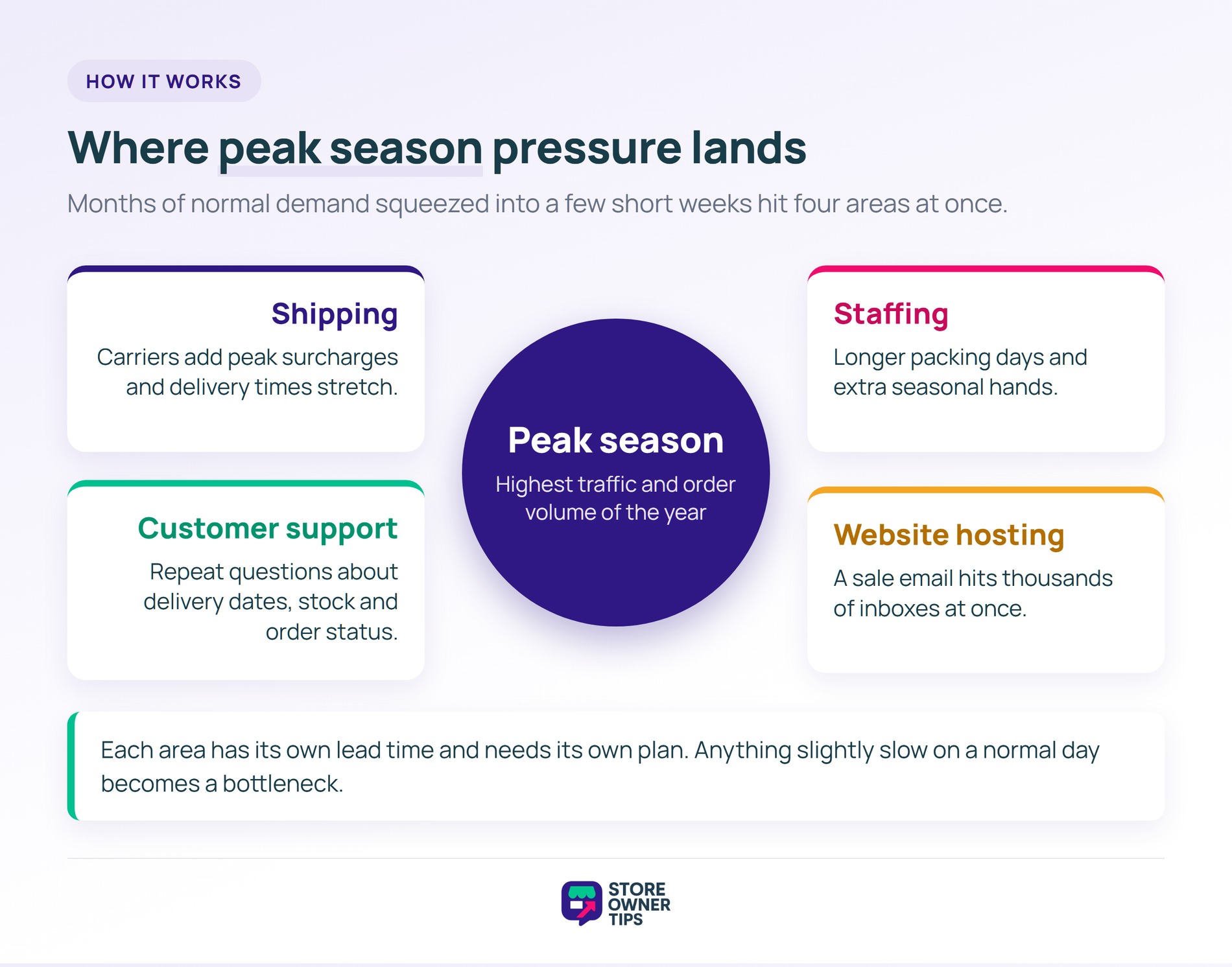
Peak season pressure lands on four areas at once. Those areas are shipping, staffing, customer support and website hosting. Each one has its own lead time and needs its own plan.
Peak season numbers are big, and they keep growing. Adobe Analytics forecasts U.S. online holiday sales will reach $275.1 billion from November 1 to December 31. Adobe expects Cyber Week alone to deliver 17.3% of that full-season spend. In other words, roughly one dollar in six lands in just five days.
Single days spike hardest during peak season. Adobe reported that shoppers spent $14.25 billion online on Cyber Monday during the 2025 holiday season. Adobe’s latest forecast expects Cyber Monday to stay the biggest online shopping day of the year.
Staffing climbs with demand. The National Retail Federation expects retailers to hire between 325,000 and 375,000 seasonal workers for the holidays. For a small online store, the same pressure shows up as longer packing days and a fuller support inbox.
Shipping costs rise during peak season because carriers add temporary surcharges to cover extra handling. The U.S. Postal Service, for example, filed a temporary holiday price change for its parcel products. Retail Priority Mail and Ground Advantage rise by $0.50 per package for light parcels in Zones 1-4. Heavier and longer-distance parcels rise by more.
UPS and FedEx publish their own demand surcharge schedules every year. Some charges hit every residential package, while others apply only to high-volume shippers. A peak surcharge works like surge pricing on a ride-share app. It’s the same trip, but the price climbs when demand spikes.
Delivery times stretch during the rush. Shoppers need clear order-by dates. A published holiday shipping cutoff tells customers the last safe day to order for on-time delivery.
Staffing, support and hosting are the systems that buckle first in peak season. Support tickets rise with orders, and many are repeat questions about delivery dates, stock and order status. An AI chatbot can answer those routine questions instantly. That frees human staff for the problems that need a person.
Hosting is the quieter risk in peak season. A site that feels fast on a quiet Tuesday can crawl when a sale email hits thousands of inboxes. That’s why this Black Friday planning timeline schedules hosting checks well before the rush. Many teams also set a code freeze, a pause on site changes, so nothing breaks mid-rush.
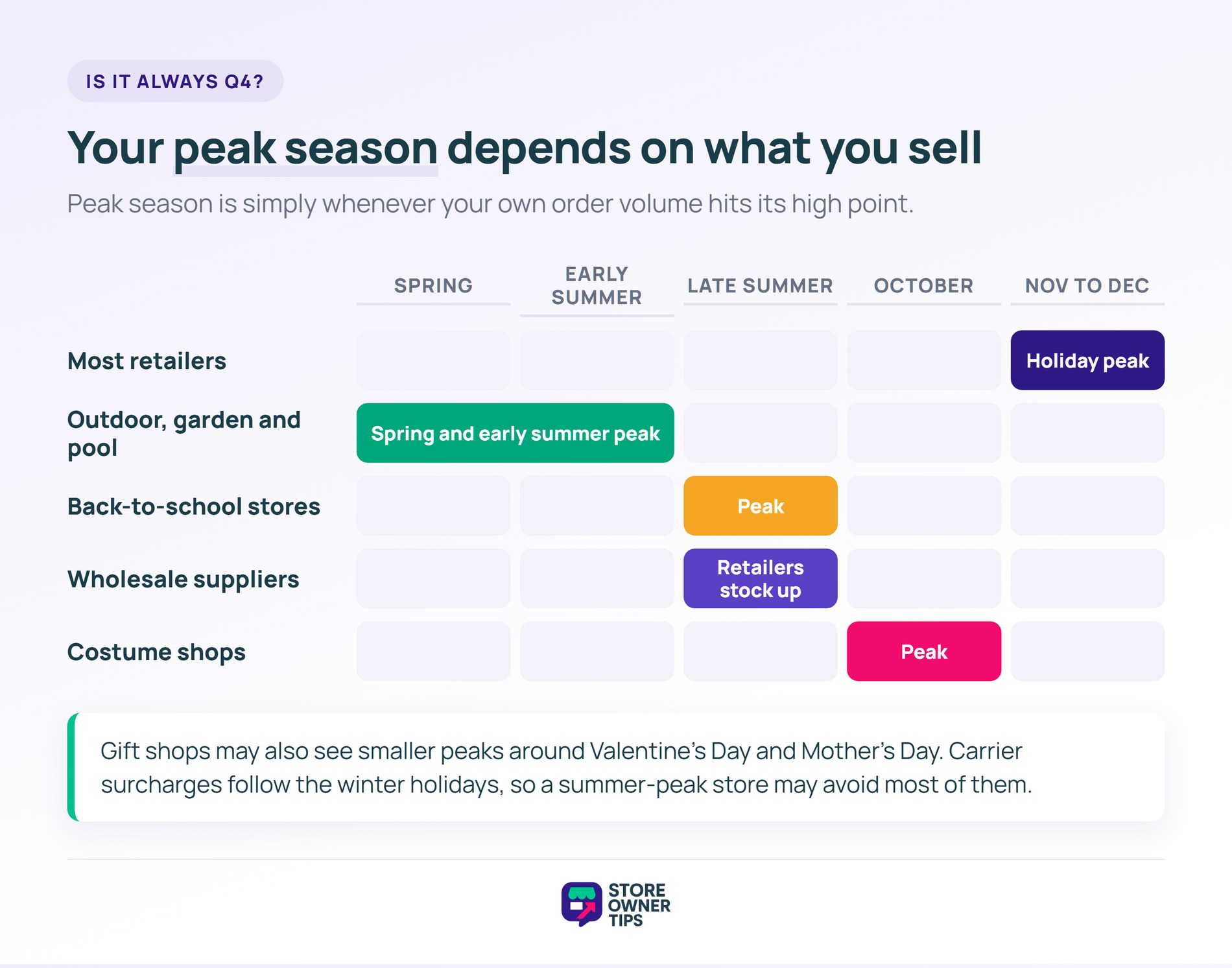
Peak season isn’t always in the fourth quarter. Peak season is simply whenever your own order volume hits its high point. Outdoor gear, gardening and pool supplies often peak in spring and early summer. Back-to-school stores peak in late summer, and costume shops peak in October.
Wholesale and gift stores can have their own rhythm. A wholesale supplier may peak in late summer, when retailers stock up for the holidays. A gift shop may see smaller peaks around Valentine’s Day and Mother’s Day. Treat each of these as a mini peak season with its own plan.
Your own sales data is the best guide to your peak season. Pull twelve months of orders and look for the weeks that run far above average. Then map those weeks against a holiday sales calendar to spot which events drive them. Carrier surcharges follow the winter holidays, so a summer-peak store may avoid most of them.
Peak season in practice looks like a planned surge, not a surprise. Here’s a hypothetical example. Imagine Ridgeback Outdoor Gear, a WooCommerce store selling tents, packs and hiking boots.
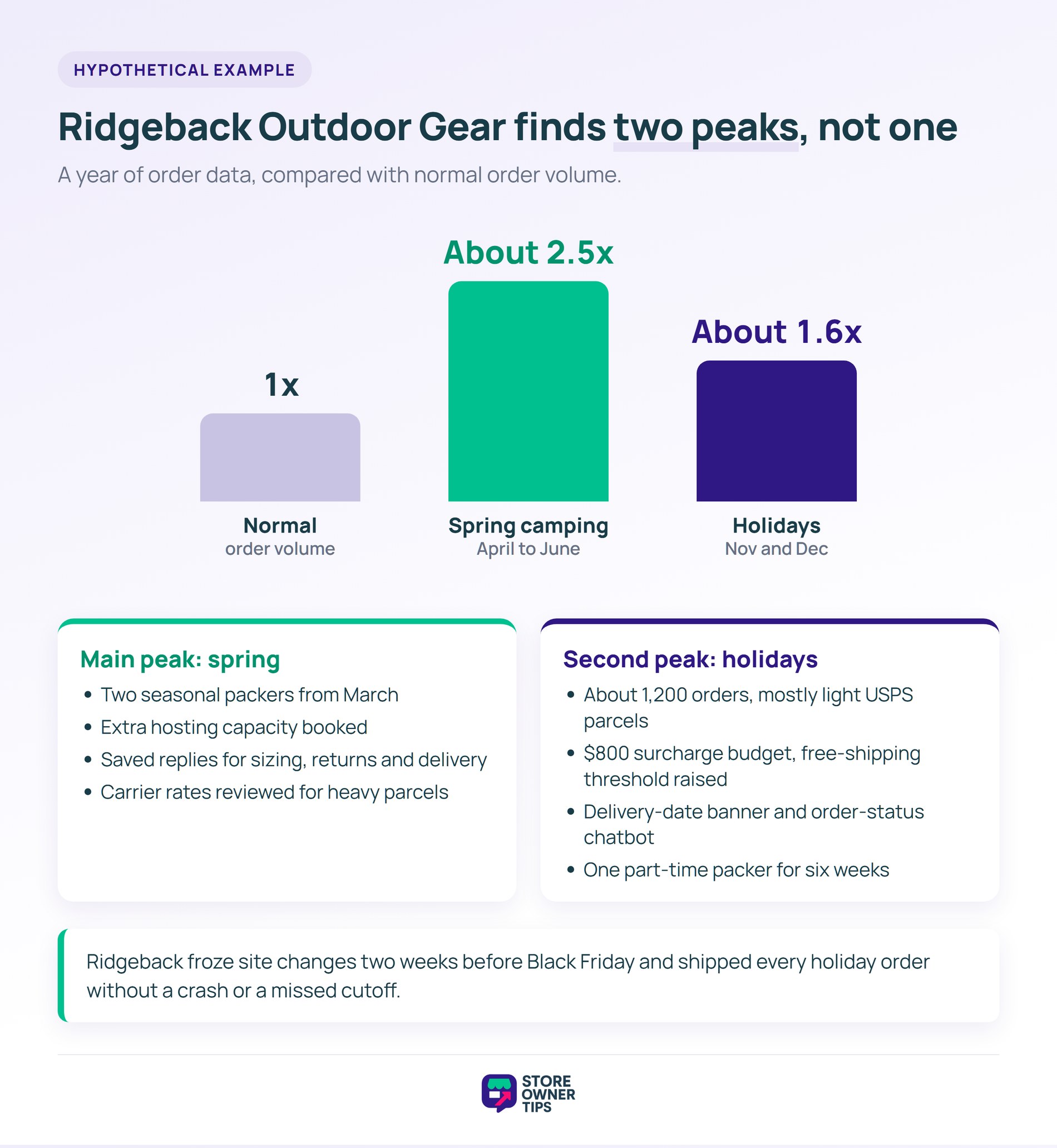
Ridgeback’s owner first assumed peak season meant Black Friday. However, a year of order data showed two peaks instead. Spring camping season, from April to June, brought about 2.5 times normal order volume. November and December brought a smaller bump, about 1.6 times normal.
That data changed Ridgeback’s plan. The owner treated spring as the main peak season and the holidays as a second, shorter one. Each peak got its own staffing, support and shipping budget.
For the holidays, Ridgeback expected around 1,200 orders, mostly light parcels shipped through USPS. If every parcel fell into the Postal Service’s 50-cent bracket, the extra cost would be about $600. Some parcels travel further, so Ridgeback budgeted $800 to stay safe. The owner raised the free-shipping threshold slightly instead of absorbing that cost.
Support was the next concern for Ridgeback. The store added a delivery-date banner to product pages and a chatbot for order-status questions. It also hired one part-time packer for six weeks.
Spring was the bigger test for Ridgeback. The owner hired two seasonal packers from March and booked extra hosting capacity with the store’s host. Ridgeback also wrote saved replies for sizing, returns and delivery questions. Tents and boots ship heavy, so the owner reviewed carrier rates for larger parcels.
Ridgeback froze site changes two weeks before Black Friday. As a result, the store shipped every holiday order without a crash or a missed cutoff. Support tickets per order fell, because shoppers found delivery answers on the page. In spring, Ridgeback ran the same playbook again, scaled up for the bigger peak.
The owner logged every problem in a shared document during both peaks. That list became the starting checklist for the following year.
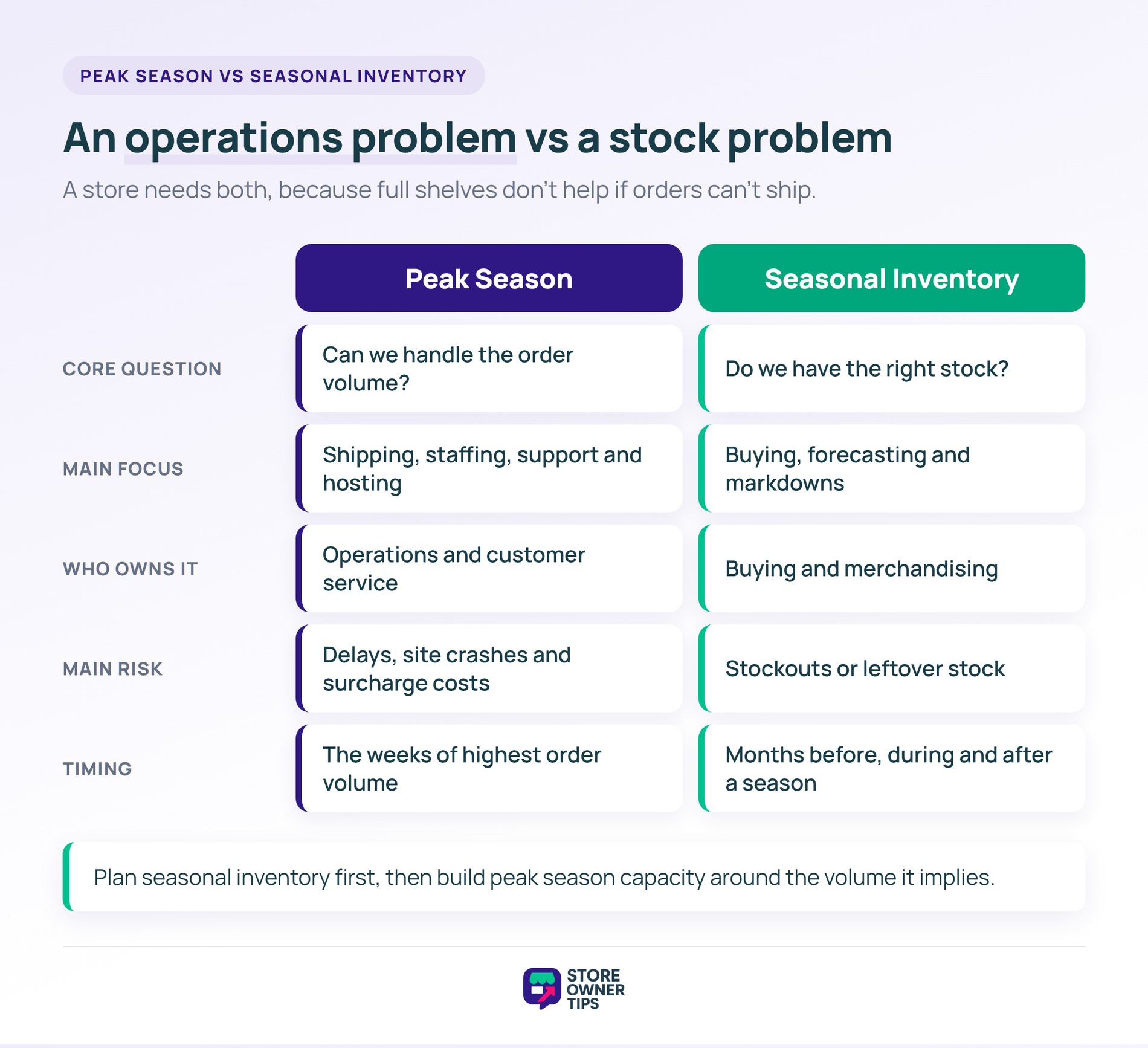
| What you’re comparing | Peak Season | Seasonal Inventory |
|---|---|---|
| Core question | Can we handle the order volume? | Do we have the right stock? |
| Main focus | Shipping, staffing, support and hosting | Buying, forecasting and markdowns |
| Who owns it | Operations and customer service | Buying and merchandising |
| Main risk | Delays, site crashes and surcharge costs | Stockouts or leftover stock |
| Timing | The weeks of highest order volume | Months before, during and after a season |
Peak season is an operations problem, while seasonal inventory is a stock problem. A store needs both, because full shelves don’t help if orders can’t ship. Plan seasonal inventory first, then build peak season capacity around the volume it implies.
A store should prepare for peak season by working backward from its busiest week. Start six to eight weeks out, because carriers, staff and hosting all need lead time. This four-week Black Friday countdown is a useful template for the final stretch.
If your peak season lines up with Black Friday Cyber Monday (BFCM), lock promotions in early. That way, operations knows what volume to expect.
Peak season for most ecommerce stores runs from November through December, the window NRF and Adobe use for holiday data. Cyber Week, from Thanksgiving to Cyber Monday, is usually the busiest stretch. Still, your store’s peak depends on what you sell. Check your own order history to find yours.
A peak season surcharge is a temporary fee carriers add to shipments during high-demand periods. USPS, UPS and FedEx each publish their own dates and amounts. Charges often vary by service, package size, zone and weight. Some apply to every shipper, while others hit only high-volume accounts.
After peak season ends, store owners should process returns, clear leftover stock and review what went wrong. Compare order volume, shipping costs and support tickets against the plan. This list of post-Black Friday tasks covers the main clean-up jobs. Write the lessons down while they’re fresh, because next year’s plan starts there.
Peak season matters because it’s when a store earns much of its revenue under the most strain. Stores that plan shipping, staffing, support and hosting ahead turn the rush into profit. Stores that wing it pay in surcharges, delays and lost customers.
Copyright © StoreOwnerTips.com. All Rights Reserved.
