Weekly ecommerce tips, deals & news.
Picture the inbox of a store shipping 200 orders a month without tracking. A big share of it is one question in slightly different words: where’s my order?
The WooCommerce order tracking plugins in this guide answer that question before it reaches you. Advanced Shipment Tracking for WooCommerce comes out on top for 2026. It’s the most installed free option we found, at around 70,000 active installs.
Many comparisons rank these plugins on carrier count, but carrier lists change between releases. We ranked them on something steadier: where tracking actually appears, and whether a customer without an account can reach it.
In our experience, that second question settles the choice for most stores faster than any feature list.
Jump to:

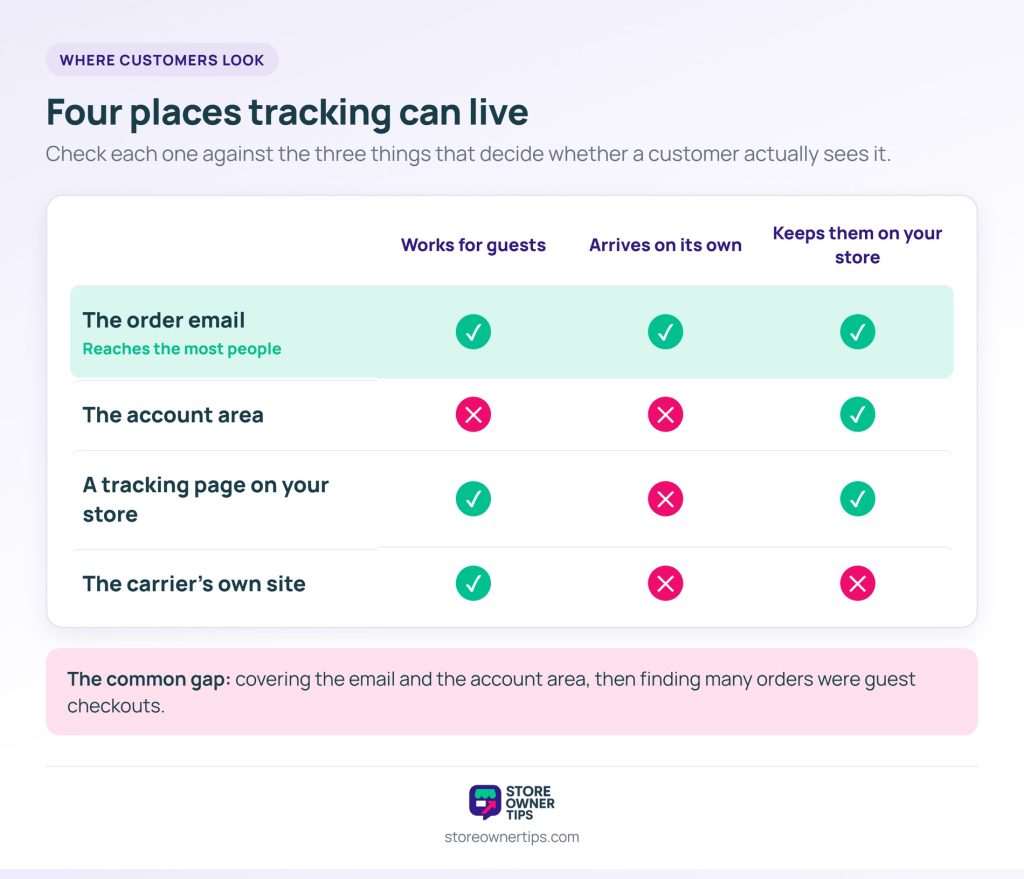
A customer can find tracking in four places, and many plugins only cover two of them.
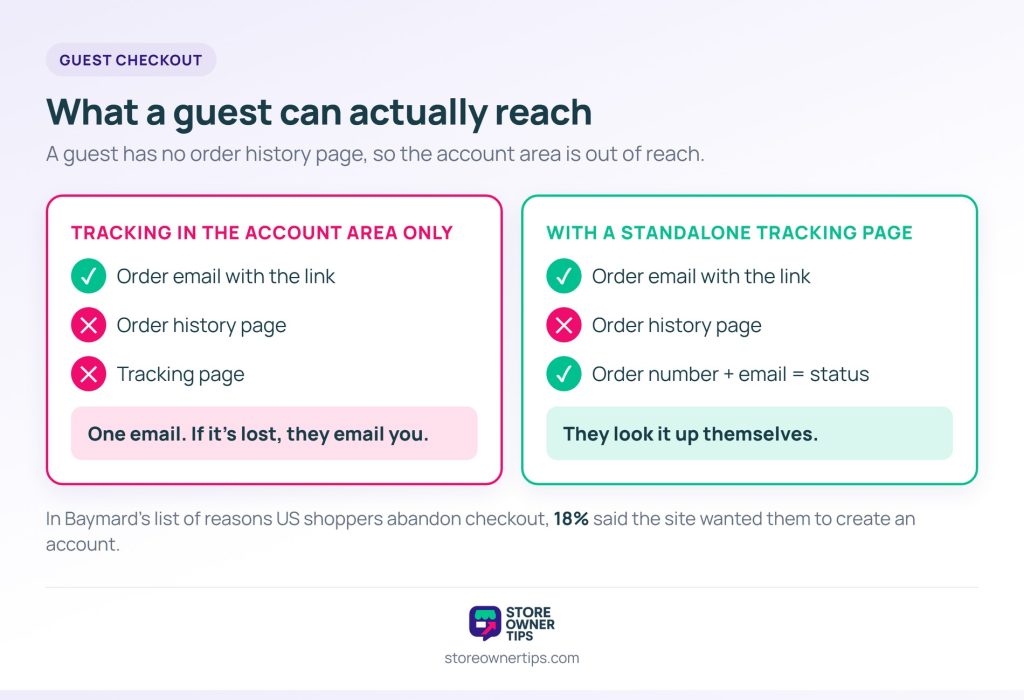
A common gap is covering the email and the account area, then finding that many orders came from guest checkouts. Those customers have no account to log into. They have one email, and if it’s lost, they have nothing.
So decide which of the four you need before comparing WooCommerce order tracking plugins. That one decision rules out a good part of this list for you.
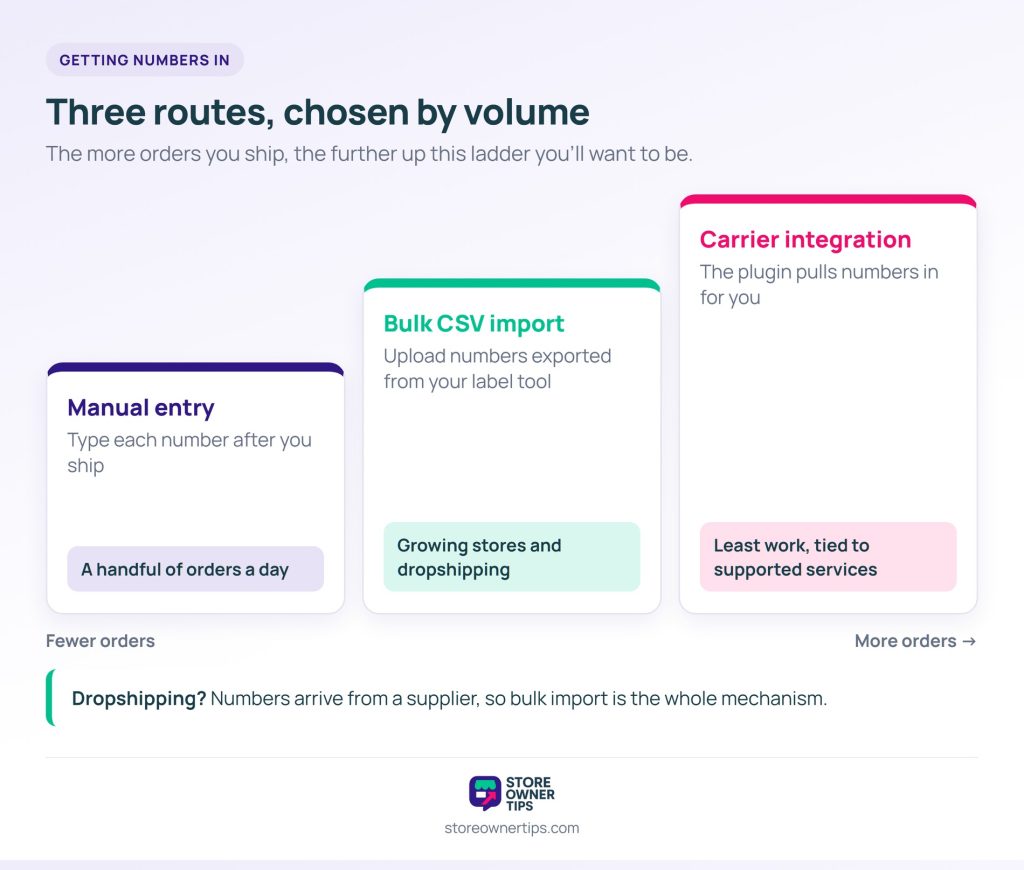
In practice, there are three routes, and the one you use depends on volume more than preference.
Manual entry means typing the number into the order after you ship it. It’s fine at a handful of orders a day, and every plugin here supports it.
Bulk import means uploading a CSV of order numbers and tracking numbers, usually exported from your label tool. For many growing stores, this is the workhorse, so it’s worth checking for specifically.
Carrier integration means the plugin talks to the carrier or label tool directly and pulls numbers in for you. It’s the least work when it fits, but it ties you to the services the plugin supports.
Meanwhile, dropshipped orders are their own case. The number comes from a supplier, often by email or spreadsheet, and often in an odd format. If that’s your model, bulk import isn’t a convenience. It’s the whole mechanism.
Getting the number in is one half of order fulfillment. The other half happens before it, and our guide to the fulfillment run from order to doorstep covers it.
We ranked these WooCommerce order tracking plugins on four things, and carrier count isn’t one of them:
We haven’t run all seven through a shipping season side by side, and we won’t imply otherwise. Instead, this draws on each plugin’s documentation, pricing page, public ratings and the code of the free versions. Figures were checked in October 2026 and will change over time.
Here’s how the seven compare on those four points, plus price. Each entry below explains the detail behind its row.
| Plugin | Free version | Where tracking shows | Guest lookup | Bulk import | Own status emails | Live carrier updates | Paid from |
|---|---|---|---|---|---|---|---|
| Advanced Shipment Tracking | Yes | Email, My Account | Via WooCommerce’s order tracking page | CSV, free | Partially Shipped and Delivered emails, free | Paid, via TrackShip | $129/yr |
| CWILL | Yes, 20 orders/mo | Email, My Account, tracking page | Tracking page, free | Yes | From $11/mo | Built in | $11/mo |
| Trakoo | Yes | Email, My Account, tracking page | Tracking number free; order ID or email in Pro | CSV, free | Own tracking email free; SMS in Pro | Via a tracking service account | $39 one-time |
| YITH Order & Shipment Tracking | Yes | My Account (emails in premium) | Premium shortcode | Premium | Premium | None found | Not confirmed |
| Order Tracking (Etoile) | Yes | Its own tracking form | Tracking form, free | Premium | Status emails, free | None, not a parcel tracker | $59 one site |
| Shipment Tracking (Woo) | No | Email, My Account | Via WooCommerce’s order tracking page | No | No, uses Completed Order email | None documented | $59/yr |
| AfterShip Tracking | Yes | Order pages, hosted tracking page | Hosted tracking page | Auto-import to AfterShip | Email and SMS from AfterShip | Built in | $29/mo, billed yearly |
The notification columns matter more than they look. In Narvar’s August 2025 survey of 3,461 US online shoppers, 38% said frequent tracking updates reduce their anxiety after buying.
Advanced Shipment Tracking has around 70,000 active installs and a 4.5-star rating from 353 reviews on WordPress.org. Its listing says it’s trusted by more than 80,000 stores.
It leads here because it treats customer notification as part of the job, not an afterthought. Plenty of plugins add a tracking field and stop there. It’s also actively maintained, with an update as recent as October 2026.
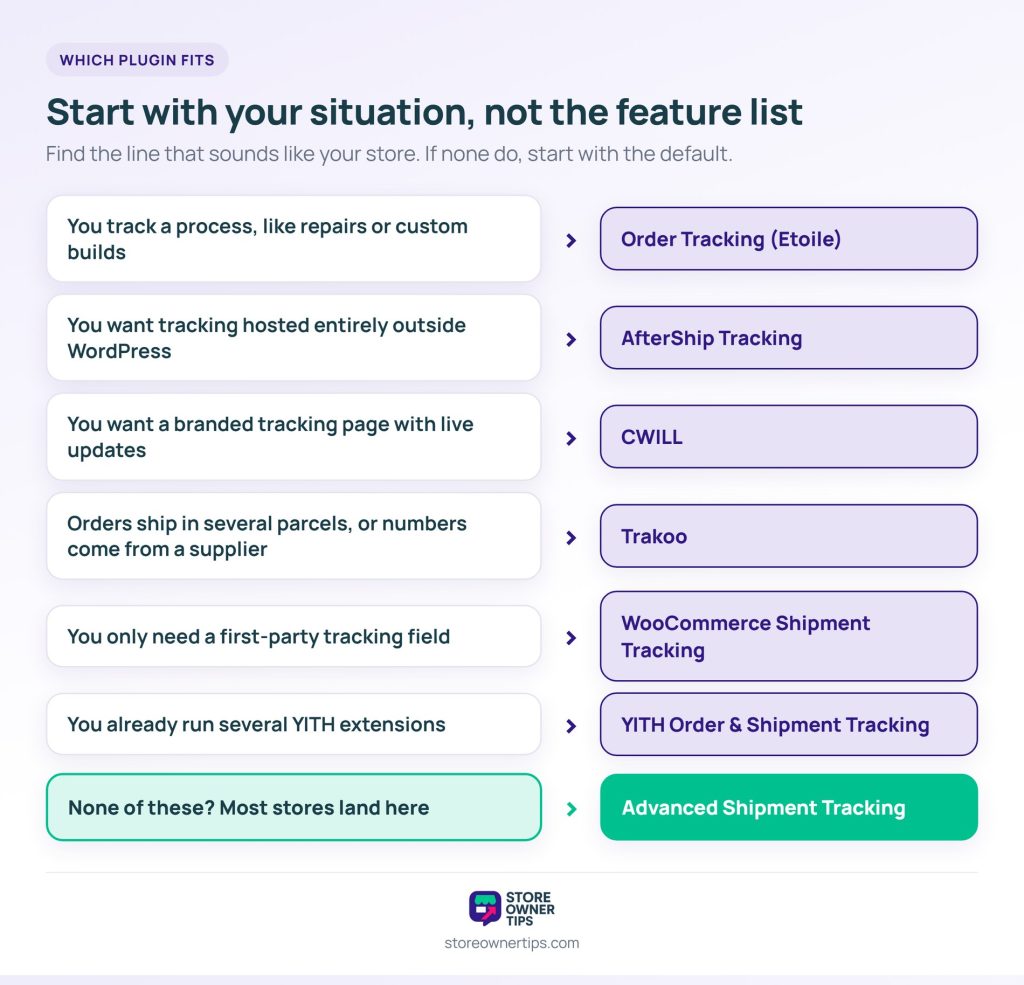
Best for: most stores. It’s the right default unless you have a specific reason to look elsewhere.
CWILL has around 7,000 active installs but the highest rating in this group: 4.9 stars from 536 reviews. That’s a lot of reviews for its install base, which usually means people feel strongly enough to rate it.
It focuses squarely on the “where is my order” problem. One thing to check first: its tested-up-to version trails most others here. So confirm it’s compatible with your WooCommerce version before you install.
Best for: stores that want a branded tracking page with live updates, and are happy to check compatibility first.
Trakoo has about 10,000 active installs and a 4.5-star rating. It’s the most thorough here about moving tracking data around. You can add, edit, import and export numbers per item.
Per-item tracking matters when one order ships in several parcels, which is common for large or backordered baskets. Meanwhile, import and export suit dropshipping and third-party logistics, where numbers arrive in bulk from someone else.
Its Pro version can also send tracking by SMS through Twilio, Nexmo or Plivo, which is unusual in this group.
Best for: stores splitting orders across parcels, and anyone receiving tracking numbers in bulk from a supplier.
YITH’s tracking plugin has around 7,000 active installs and a 3.7-star rating, the lowest among the directory-listed plugins here. It comes from an established WooCommerce extension vendor with a large catalog.
That vendor relationship has real value if you already run other YITH extensions and want one place to manage licenses. Judged on ratings alone, though, the plugins above score higher, so we’d start there.
Best for: stores that already run several YITH extensions.
Order Tracking has about 3,000 active installs and a 4.6-star rating. It’s a different shape from everything else here: a general WordPress status tracker, not a WooCommerce shipment tool.
That makes it useful for stores tracking something other than a parcel, like repairs, custom builds or service jobs. If your “order” is a process with stages, a shipment tracker is the wrong fit and this one is closer.
Best for: stores tracking a process, not a parcel.
This is the official extension, built by the WooCommerce team. It adds tracking numbers and carrier links to orders and to the customer’s view. It’s a paid extension, not a free plugin.
Choose it if you want a first-party extension with a clear support path. It’s also the most basic option here. It covers the tracking field and display, without the notification tools the leaders offer.
Best for: stores that want a first-party extension and only need the tracking field itself.
AfterShip Tracking has around 7,000 active installs and a 4.8-star rating from 633 reviews. The plugin connects your store to AfterShip, which handles carrier detection, status updates and notifications outside WordPress.
That’s the trade. You get live updates across 2,000+ carriers and a branded tracking page without hosting any of it. In return, tracking runs on a monthly subscription once you outgrow the free plan.
Its tested-up-to version is the oldest here, at WordPress 6.8, so check compatibility before installing.
Best for: stores that want live tracking and notifications handled entirely by an outside service.
If you’re unsure where to start, install the free version of Advanced Shipment Tracking first. Then check where a guest customer can see their tracking, which the next section covers.
A guest can only see what reaches them without logging in. Yet many tracking setups quietly assume the customer has an account.
Plenty of shoppers prefer not to make one. In Baymard’s list of reasons US shoppers abandon checkout, 18% said the site wanted them to create an account.
Unlike an account holder, a guest has no order history page. If your tracking lives only in the account area, their single route to it is your email. And emails get deleted, filtered and lost.
A standalone tracking page fixes this. It asks for an order number and email address, then shows the current status. The customer only needs the order confirmation they already have, and fewer people email you instead.
🔍️ What we’ve seen store owners miss: tracking gets set up in the account area and tested as an admin. Nobody notices that most orders were guest checkouts. The feature works perfectly, but many customers can’t reach it, so support emails don’t drop.
The email route stays the most reliable of the four. That’s why the notification side of WooCommerce order tracking plugins deserves as much attention as the tracking side. It also sits alongside your other customer service tools and workflows. Tracking that’s easy to find is a support email that never arrives.
Many stores end up with several carriers: one for standard parcels, one for express, another for international.
For tracking, that means storing a carrier per shipment rather than per store, and building the right link for each. Every one of the WooCommerce order tracking plugins here handles several carriers. What varies is how easy it is to add one that isn’t on the built-in list.
For that reason, if your carrier mix is complex, choose your shipping plugin first. The tool that makes your labels usually decides the format your tracking numbers arrive in.
Marketplaces, however, are the hardest version of this. Each seller ships separately, often with different carriers, while the customer sees one order. WC Vendors handles marketplace shipping at the marketplace level, which is where that problem belongs.
WooCommerce’s own toolkit covers part of this job, and for some stores it’s enough.
[woocommerce_order_tracking] shortcode builds a form asking for the Order ID and Billing email. It shows the order’s status and details, plus tracking from plugins that add it there.The catch with Order Fulfillments is that it’s off by default, with no switch in the settings. You turn it on with the WP-CLI command wp option update woocommerce_feature_fulfillments_enabled yes. WooCommerce still calls it a beta, so try it on a staging site first.
None of these send carrier updates like “out for delivery”. If you want those without checking the carrier yourself, that’s where the WooCommerce order tracking plugins above come in.
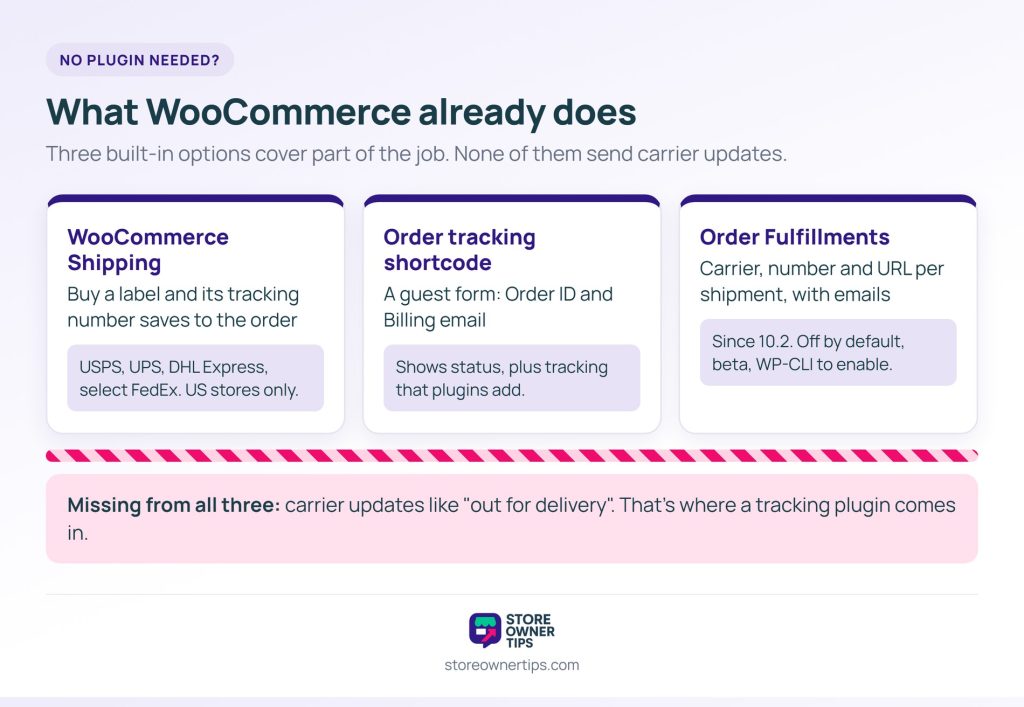
Partly. Since WooCommerce 10.2, core has a beta Order Fulfillments feature that stores tracking numbers, but it’s off by default. The free WooCommerce Shipping plugin also saves tracking when you buy a label. For a branded tracking page or carrier updates, you still need a plugin.
They need the tracking link in their order email, or a tracking page that takes an order number and email. If your tracking only lives in the account area, guest customers can’t reach it.
Most plugins here support bulk import. It’s worth checking for if you ship more than a handful of orders a day. Check the expected column format before you export from your label tool. A mismatched format is a common reason imports fail.
Both, with the email as the priority. The email reaches everyone, including guests, while the account area helps returning customers. If you can only do one, do the email.
Some do, by checking the carrier for status changes and then updating the order or notifying the customer. Others only store the number and build a link. Automatic updates are more useful, and they’re also the feature most likely to need a paid plan.

Where tracking appears matters more than which plugin puts it there. Check what share of your orders are guest checkouts. That tells you whether you need a standalone tracking page, or whether the email and account area are enough.
Here’s what to do next:
Tracking is one of a handful of plugins most growing stores add sooner or later. It’s worth seeing alongside the WooCommerce plugins every store ends up needing.
After tracking, the next post-purchase document customers ask for is the invoice. Our guide to WooCommerce invoices covers having your store produce those automatically.

Copyright © StoreOwnerTips.com. All Rights Reserved.
